



Three residential maintenance calls shouldn't take eight hours. But watch any HVAC tech running a multi-stop day in spread-out suburban territories, and you'll see exactly why they do. The tech starts their first preventive maintenance at 8:30 AM, finishes at 9:45, then drives 35 minutes to the next house. By noon, they've completed two calls and spent almost as much time driving as working. The afternoon gets worse when a simple filter change turns into a capacitor replacement, pushing everything back another hour.
The math on residential routing breaks down fast when you're mixing preventive maintenance, repairs, and diagnostics across neighborhoods. Each job type needs different time buffers, tool loads, and arrival windows. String them together wrong and your techs either rush through jobs or show up late all afternoon.
Most HVAC companies handle this by letting dispatchers "eyeball it" based on experience. They group jobs by general area, assume 30-minute drive times between stops, and hope nothing goes sideways. When it inevitably does, everyone scrambles to reschedule.
Why residential routing fails at three stops or more
The core problem isn't distance—it's variance. A maintenance check takes 45-90 minutes. A diagnostic call runs 60-120 minutes. A repair might be 30 minutes for a capacitor swap or three hours for a compressor. Mix these on the same route and your time calculations explode.
-
8
00 AM - Maintenance in Westfield (45 min expected)
-
9
30 AM - Diagnostic in Carmel (90 min expected)
-
11
30 AM - Repair in Fishers (unknown duration)
-
1
30 PM - Maintenance in Noblesville (45 min expected)
-
3
00 PM - Diagnostic in Zionsville (90 min expected)
Looks reasonable on paper. In reality, that Westfield maintenance finds a dirty evaporator coil, adding 30 minutes. The drive to Carmel hits school traffic. The Fishers repair needs a part run. By 2 PM, the tech is calling to reschedule Noblesville and Zionsville, and dispatch is scrambling to find coverage.
The variance compounds. A 15-minute delay on stop one becomes a 30-minute delay by stop three. Customers who took time off work are frustrated. The tech feels rushed and starts cutting corners. Quality drops. Callbacks increase.
Batching by job type: the 70% rule that actually works
Routes with more than 70% similar job types hold their schedule. Routes mixing job types equally blow up by early afternoon.
Eliminate scheduling chaos and missed jobs.
Coolyly helps HVAC companies book, coordinate, and track every service efficiently.
- Unified appointment & dispatch management
- Automated client notifications
- Technician scheduling & job tracking
No credit card required
What works:
Maintenance-heavy days (70%+ PM calls):
-
Load 4-5 maintenance stops
-
Add one diagnostic as a floater
-
Build 15-minute buffers between similar calls
-
Keep total windshield time under 90 minutes
Diagnostic-heavy days (70%+ troubleshooting):
-
Cap at 3-4 diagnostic calls
-
No repairs unless parts are confirmed on-truck
-
Build 30-minute buffers between stops
-
Accept that you'll finish early some days
Repair days (predetermined parts):
-
Maximum 3 repairs with known parts
-
One maintenance call as morning warm-up
-
45-minute buffers for unexpected complications
-
Keep one slot open for emergency add-ons
Group truck loads by part families for maintenance-heavy days to minimize mid-route runs.
The 70% rule forces clarity. A tech doing mostly maintenance thinks differently than one bouncing between job types. They load their truck differently. They mentally prepare differently. They move through houses with a consistent rhythm.
Buffer math for mixed-duration days
Standard dispatching uses flat buffers—usually 30 minutes between every call. This fails because job variance isn't flat. A maintenance call that runs long usually adds 15-20 minutes. A diagnostic that goes sideways might add two hours.
Variable buffer calculation:
For maintenance calls:
-
Base time
60 minutes
-
Buffer
15 minutes
-
Drive allowance
Actual + 10 minutes
For diagnostics:
-
Base time
90 minutes
-
Buffer
30 minutes
-
Drive allowance
Actual + 15 minutes
For repairs (known issue):
-
Base time
Part-specific estimate
-
Buffer
45 minutes
-
Drive allowance
Actual + 20 minutes
For first calls (any type):
-
Add 15 minutes finding the house
-
Add 10 minutes customer introduction
-
Add 10 minutes truck setup
Stack these buffers based on sequence. A maintenance-diagnostic-maintenance day needs:
-
Stop 1
60 + 15 + 25 (first call buffer) = 100 minutes
-
Stop 2
90 + 30 = 120 minutes
-
Stop 3
60 + 15 = 75 minutes
-
Total work time
295 minutes
-
Add drive time based on actual distances
Sounds excessive until you track real days. Those buffers get eaten by customers who aren't ready, access issues with locked gates and dogs, previous tech's incomplete notes, tool runs to the truck, part verification calls, quick customer education moments, and documentation time.
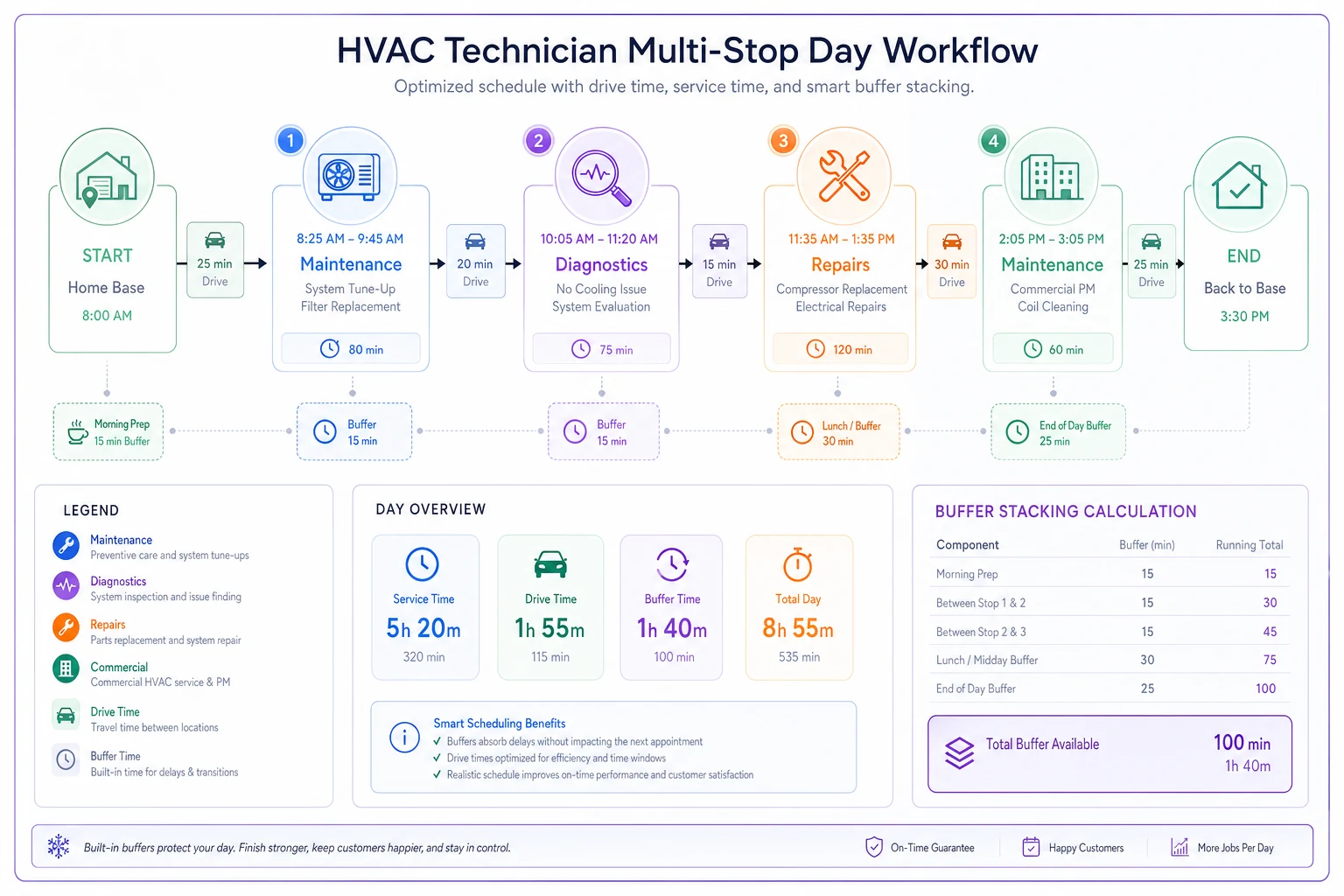
The diagram shows how buffers stack across a mixed day and where drive time fits into total route time.
Territory constraints that everyone ignores
ZIP code adjacency doesn't equal routing efficiency. Two houses might share a ZIP code but sit on opposite sides of a highway with one bridge crossing. Meanwhile, houses in different ZIPs might be three minutes apart on surface streets.
Real territory batching considers:
Natural boundaries:
-
Highways that limit crossing points
-
Rivers and bridges
-
School zones with time restrictions
-
Construction zones (check daily)
-
Rush hour bottlenecks
Customer patterns:
-
Retirement communities (available all day)
-
School districts (avoid 2
30-3:30 PM)
-
Business districts (lunch hour issues)
-
New developments (GPS problems)
Map out your actual drive times during different day parts. That 15-minute morning drive might be 35 minutes at 3 PM. Build routes that respect these patterns instead of fighting them.
Some companies split territories by time zones—not literal time zones, but traffic patterns. North territory runs 7 AM - 3 PM to avoid afternoon highway traffic. South territory runs 9 AM - 5 PM to miss morning congestion. West territory does 8 AM - 4 PM year-round. Completion rates jump with this approach.
Job type mixing rules (and when to break them)
Pure batching by job type sounds great until you have two diagnostics in the same neighborhood and three maintenances 20 miles away. The efficiency gain from grouping gets destroyed by windshield time.
Mixing rules that work:
Always safe to mix:
-
Maintenance + maintenance
-
Light repair + maintenance
-
Diagnostic + diagnostic
Mix with caution:
-
Diagnostic + repair (only if parts confirmed)
-
Heavy repair + anything (schedule as day's last stop)
-
Emergency + scheduled (customer expectation management critical)
Never mix:
-
Install + service calls
-
New construction + residential service
-
Warranty work + paid calls (different mindsets)
When you must mix job types, sequence matters. Put your highest-variance call last. A diagnostic that runs long at 4 PM means one reschedule. The same diagnostic running long at 9 AM cascades through the entire day.
Before and after: tracking the right completion metrics
Most companies track arrival windows and completion rates. These metrics lie about routing efficiency. A tech can hit every arrival window by rushing through calls. They can show 100% completion by doing surface-level work.
Better metrics for multi-stop days:
Quality-adjusted completion rate:
-
Calls completed ÷ Calls scheduled
-
Minus callbacks within 7 days
-
Minus "needs follow-up" tags
Revenue per windshield minute:
-
Total collected revenue ÷ Total drive time
-
Shows if routing actually improves margins
-
Identifies routes that lose money despite completion
Buffer utilization rate:
-
Actual time used ÷ Buffered time
-
Should run 70-80%
-
Under 60% means over-buffered
-
Over 90% means under-buffered
| Metric | Calculation |
|---|---|
| Quality-adjusted completion rate | Calls completed ÷ Calls scheduled; Minus callbacks within 7 days; Minus "needs follow-up" tags |
| Revenue per windshield minute | Total collected revenue ÷ Total drive time; Shows if routing actually improves margins; Identifies routes that lose money despite completion |
| Buffer utilization rate | Actual time used ÷ Buffered time; Should run 70-80%; Under 60% means over-buffered; Over 90% means under-buffered |
Track these by route type. Maintenance routes should show different patterns than diagnostic routes. Mixed routes will have higher variance—that's expected and acceptable if managed properly.
Real scenario: 12 routes restructured
A 12-tech company running 4 maintenance techs, 4 diagnostic techs, and 4 swing techs was averaging 3.2 calls per tech per day with 68% on-time arrival. Callbacks ran around 8%. Drive time averaged 2.5 hours per day per tech.
After restructuring to job-type batching with proper buffers:
Maintenance techs (4):
-
Increased to 4.8 calls per day
-
91% on-time arrival
-
5% callback rate
-
1.8 hours drive time
Diagnostic techs (3):
-
Held at 3.1 calls per day
-
85% on-time arrival
-
6% callback rate
-
2.1 hours drive time
Flex techs (5):
-
3.8 calls per day average
-
78% on-time arrival
-
7% callback rate
-
2.3 hours drive time
Total daily completions went from 38 to 45. Customer satisfaction scores improved because techs weren't rushed. The evening scramble to reschedule disappeared. Overtime dropped by roughly 30%.
Software routing vs human judgment
Automated routing promises to solve all these problems. Plot your calls, click optimize, and watch the perfect routes appear. Except software doesn't know that Mrs. Henderson needs extra time for questions, or that the Thompson house has an angry dog, or that Maple Street is torn up for sewer work.
Good routing needs both. Let software handle the math—calculating drive times, optimizing sequences, balancing workloads. But give dispatchers override ability for the human factors. The best systems let dispatchers set constraints while software optimizes within those bounds.
For instance, the software might suggest putting a diagnostic call at 8 AM for routing efficiency. But the dispatcher knows that customer works nights and specifically requested afternoon. The software recalculates with that constraint rather than forcing a bad fit.
This hybrid approach catches:
-
Customers who must be first or last
-
Techs who excel at certain job types
-
Neighborhood-specific access issues
-
Customer personality matches
-
Previous service history complications
The software prevents obvious mistakes like scheduling stops on opposite ends of town. Humans prevent subtle mistakes like sending the wrong tech personality to a difficult customer.
When batching rules break down
Some days, the rules don't work. Emergency calls blow up your carefully batched routes. A truck breaks down. A tech calls in sick. Three customers reschedule morning-of. These aren't failures of the system—they're realities of service work.
Build escape valves:
Float capacity: Keep one tech unscheduled until 10 AM daily. They cover emergencies, sick calls, or routes running behind. Some days they run maintenance. Other days they save your on-time metrics.
Flex zones: Overlap territory edges by 2-3 miles. When Route A falls behind, Route B can grab their edge calls without massive drive time penalties.
Escalation triggers: Define exactly when to abandon the plan. If a tech is 90+ minutes behind by noon, stop trying to save the route. Reschedule the afternoon and move on.
Customer triage: Not every reschedule is equal. The annual maintenance can move. The no-cooling call in 95-degree heat cannot. Build priority rules that everyone understands.
Perfect routing is a myth in residential service. Good routing acknowledges that reality and builds systems that bend without breaking.
Making the switch from chaos to structured routes
Moving from dispatcher intuition to structured routing feels risky. Your experienced dispatchers know things that no rulebook captures. But watch them for a week and you'll notice they follow patterns, even if they can't articulate them.
Start by documenting what already works. Which routes consistently finish on time? Which techs handle mixed days well? Which territories always run smooth versus chaotic? Find the patterns hiding in your successful days.
Then implement gradually:
Week 1-2: Track current performance honestly. Most companies discover they're completing fewer calls than they thought when you factor in callbacks and rushed work.
Week 3-4: Try batching just your maintenance routes. These are most predictable and easiest to optimize.
Week 5-6: Add diagnostic batching for specific techs. Pick your most organized techs who already follow consistent processes.
Week 7-8: Implement buffer math without telling techs. See if proper buffers reduce stress without them knowing why their days feel easier.
Week 9-12: Roll out territory-based constraints and measure the impact.
This phased approach lets you course-correct without disrupting everything. It also builds buy-in as people see real improvements in their daily chaos levels.
The compound effect of proper residential routing
Fix routing and watch the dominoes fall. Techs show up on time, so customers are ready. Jobs stay on schedule, so quality improves. Callbacks drop, freeing capacity for more revenue calls. Drive time decreases, cutting fuel costs and wear. Overtime shrinks because days end predictably.
Save 30 minutes of drive time per tech per day across 10 techs. That's 50 hours per week of newfound capacity. At $125 per call average, even converting half that time to billable work adds substantial revenue without adding techs or trucks.
But the bigger win is operational calm. Dispatchers stop firefighting and start optimizing. Techs stop rushing and start doing quality work. Customers stop complaining about late arrivals and start trusting your schedules.
Modern HVAC operations software with AI automation makes this systematic approach sustainable. Instead of dispatchers manually calculating buffers and remembering territory constraints, the system handles the complex math while learning from actual completion patterns. It knows that Tuesday afternoon routes in the school district need extra buffer, that certain job type combinations consistently run over, and which techs excel at specific route types.
The software becomes your routing memory, codifying what works and preventing what doesn't. Dispatchers focus on exceptions and customer relationships instead of wrestling with basic logistics. Routes that once took an hour to build now generate in minutes, properly buffered and batched.
Residential HVAC routing isn't about finding the shortest path between houses. It's about understanding job types, respecting variance, building proper buffers, and creating predictable days for both techs and customers. Get these fundamentals right, and multi-stop residential days transform from daily chaos into a reliable revenue engine.
Ready to optimize your HVAC operations?
Join hundreds of HVAC businesses using Coolyly to save time, improve technician utilization, and enhance customer satisfaction.