

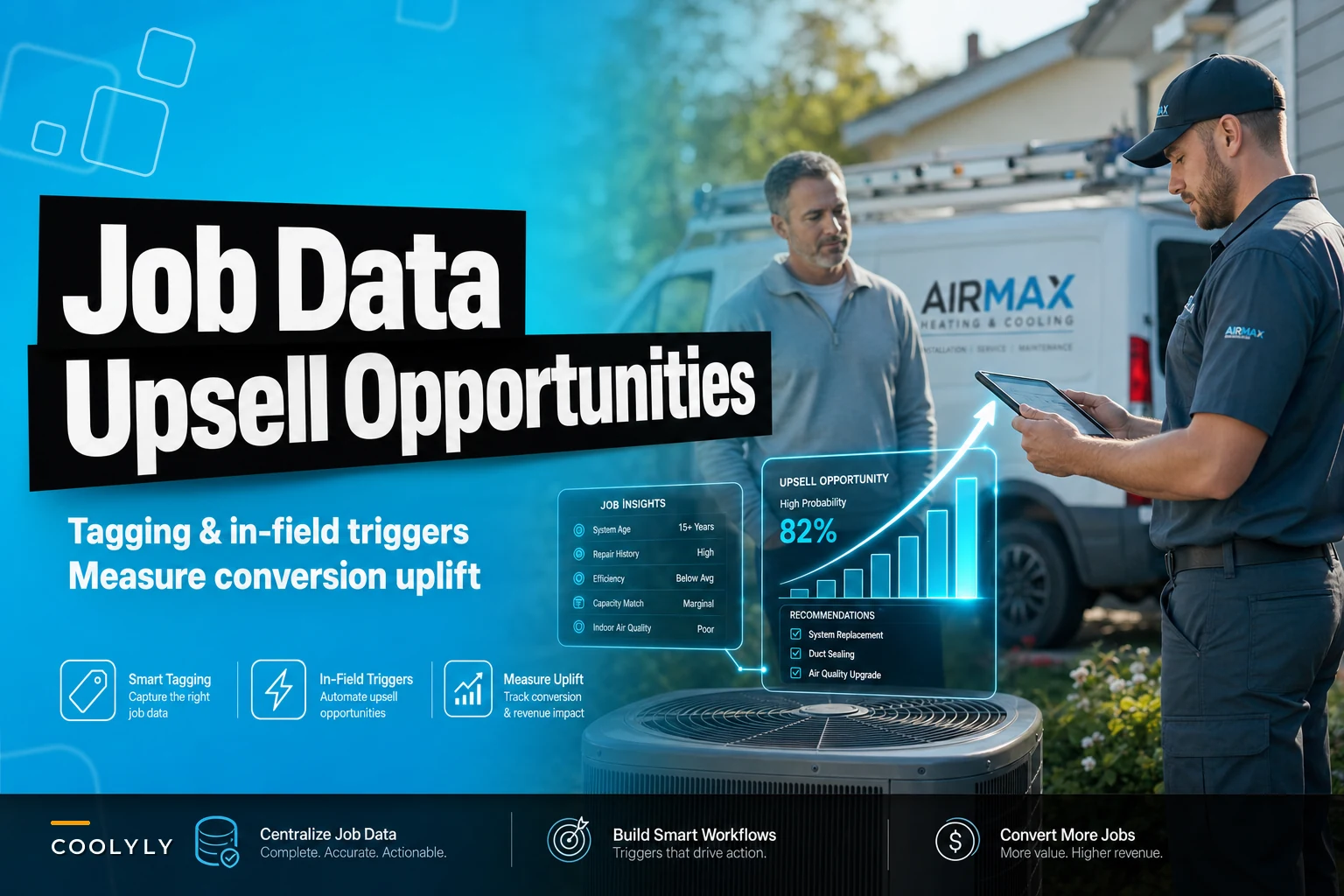

Most HVAC companies sit on years of service data without realizing they're ignoring their best revenue opportunity. Every repair call, every maintenance visit, every equipment age milestone contains upgrade potential that techs miss because nobody connects the dots between what happened yesterday and what the customer needs tomorrow.
The typical HVAC business leaves roughly $180,000 in annual retrofit revenue untouched simply because their service history stays buried in disconnected job notes, paper forms, and technician memories. Not because customers don't need upgrades — they absolutely do — but because there's no systematic way to identify and act on those opportunities when techs are standing in front of the equipment.
The broken reality of HVAC upsell from service history
A tech finishes replacing a capacitor on a 14-year-old Carrier unit. Two months later, another tech services the same house for a different issue. Nobody mentions the system's age. Nobody suggests the homeowner start planning for replacement. Six months later, that unit fails completely during a heat wave, and the customer ends up buying from a competitor who can install faster.
This happens because most HVAC operations treat each service call like an isolated event. The information exists — buried in job tickets, scattered across different software, trapped in technicians' heads — but it never surfaces at the right moment.
Your best tech knows Mrs. Johnson's system struggles every summer and probably needs replacement soon. But when the newer guy shows up for her spring maintenance, he has no idea about the pattern. He performs the tune-up, collects payment, and leaves. Three weeks later, Mrs. Johnson calls a competitor for a second opinion on her struggling AC, and you lose a $7,800 replacement job.
The frustrating part? You had all the signals. Four service calls in 18 months. Refrigerant top-offs. Repeated capacitor issues. A system manufactured in 2009. But without systematic tracking and triggers, those signals mean nothing.
Job tagging that actually drives revenue
Forget complex categorization schemes. Effective job tagging for upsells focuses on three things: equipment age, repair frequency, and replacement indicators.
Eliminate scheduling chaos and missed jobs.
Coolyly helps HVAC companies book, coordinate, and track every service efficiently.
- Unified appointment & dispatch management
- Automated client notifications
- Technician scheduling & job tracking
No credit card required
Start with age milestones. Tag every job on equipment 10+ years old as "Monitor for replacement." At 12 years, upgrade to "Replacement candidate." At 15+, mark it "Priority replacement discussion." These aren't just labels — they become triggers for specific tech actions and follow-up sequences.
Then layer in repair patterns. When the same address hits three repairs in 12 months, that's an automatic "Frequent repair" tag. When repair costs exceed 40% of replacement value, tag it "Repair vs replace evaluation." These tags build a replacement readiness score without requiring manual analysis.
-
Equipment manufacture date
-
Cumulative repair cost (running total)
-
Repair frequency (calls per year)
-
Efficiency degradation indicators
-
Warranty status changes
-
Previous upgrade discussions
A residential service company in Phoenix implemented this tagging structure across 4,200 active customers. Within four months, they identified 340 systems prime for replacement that they'd been servicing repeatedly without ever pitching upgrades. Those tags translated to 67 replacement sales worth roughly $420,000.
The critical shift: tags become automatic, not manual. When a tech enters a manufacture date during any service call, the system calculates age and applies appropriate tags. When repair costs accumulate past thresholds, tags update automatically. No extra work for techs, but suddenly every job contributes to your replacement pipeline.
Building triggers that surface opportunities at the perfect moment
Tags mean nothing if they don't trigger action. The magic happens when those tags automatically surface recommendations exactly when techs can act on them.
Picture a tech arriving for a routine maintenance call. As they pull up the job on their tablet, the system shows: "Alert: Third service this year. System age 13 years. Suggest replacement consultation." Not buried in notes. Not requiring research. Right there, impossible to miss.
These triggers need three components to work:
Timing triggers activate based on service intervals. After two repairs within six months, trigger a replacement discussion prompt. When annual repair costs hit $1,800 on residential equipment, trigger a cost comparison worksheet. When equipment passes 12 years during peak season, trigger a proactive replacement campaign.
Context triggers consider the current situation. During a no-cooling call in July, don't push replacement — fix the immediate problem. But trigger a follow-up for September when customers think more clearly about big purchases. During maintenance visits, trigger comfort upgrade discussions. During minor repairs, trigger warranty and protection plan offers.
Stacking triggers combine multiple signals for stronger recommendations. A 14-year-old system (trigger 1) with two recent repairs (trigger 2) during a maintenance visit (trigger 3) produces a "Strong replacement candidate - discuss today" alert with talking points and financing options pre-loaded.
One mid-sized company in Atlanta built triggers around seasonal patterns. Their system flagged every 10+ year-old unit serviced in spring for follow-up in early fall — right before heating season. That single trigger pattern generated 89 replacement consultations and 31 closed deals worth approximately $248,000.
In-field recommendation workflows that techs actually follow
The best triggers fail when field workflows don't support them. Techs need more than alerts — they need guided processes that fit naturally into service calls without adding complexity.
When that replacement trigger fires, the tech's tablet should immediately display a three-step workflow:
Step 1: Age and efficiency check (30 seconds). The system pre-fills known data and prompts for visual confirmation. Is the manufacture date correct? Any visible deterioration? Current SEER rating?
Step 2: Cost comparison display (45 seconds). Show the customer actual numbers: "You've spent $2,400 on repairs in 18 months. A new system costs $7,200 and includes warranty." No complex calculations. No guessing. Just clear data the customer understands.
Step 3: Soft recommendation with follow-up (60 seconds). "Based on your repair history and system age, it might make sense to start planning for replacement. Should I have our comfort advisor call you this week to discuss options?" Yes or no. Either answer gets logged.
Pre-fill manufacture dates and basic equipment info during every visit so the workflow runs instantly when a trigger fires.
Visual of the three-step in-field workflow:
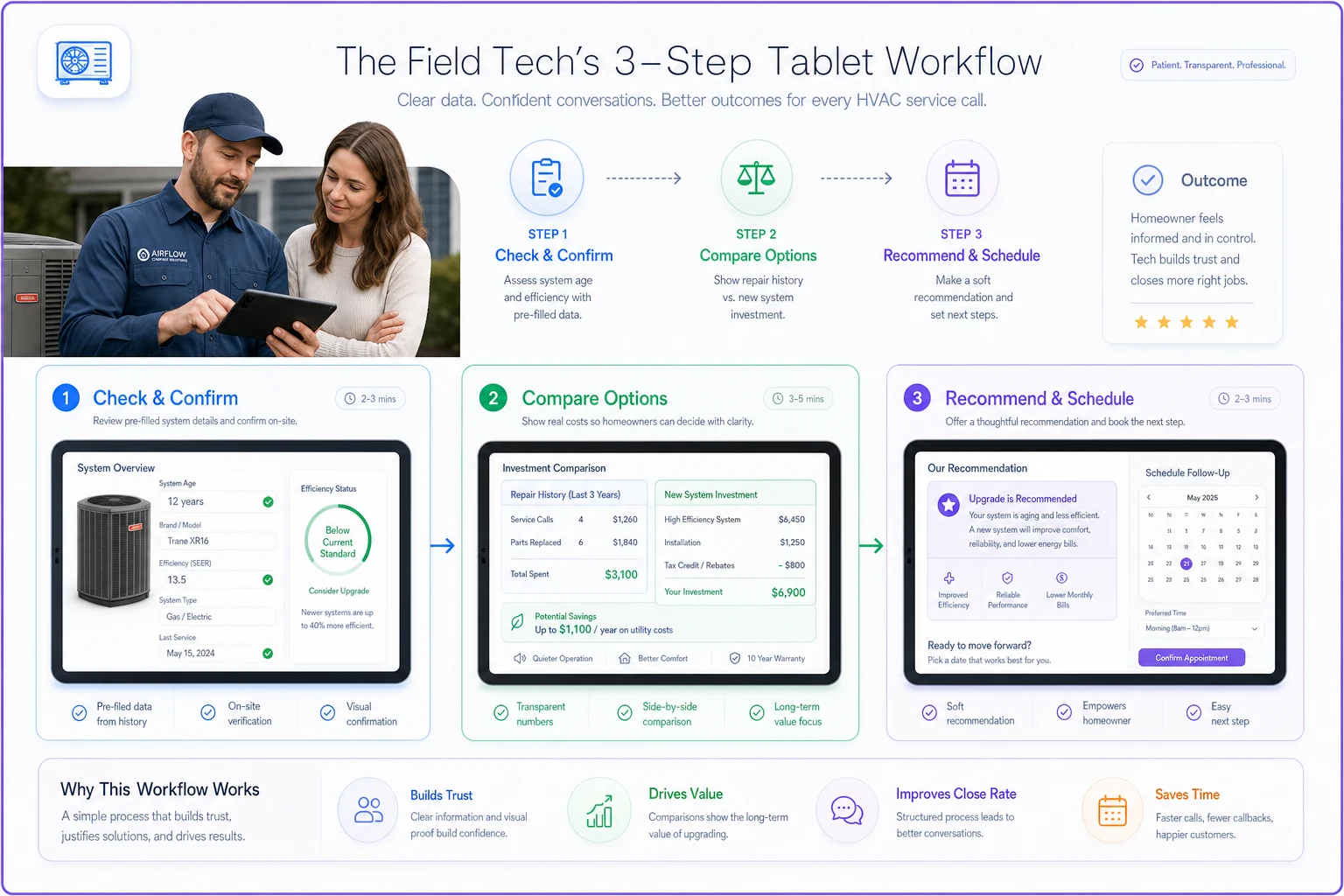
The entire workflow takes under three minutes and happens while the tech is already on-site. No special sales skills required. No pressure tactics. Just systematic presentation of relevant information at the right moment.
But the workflow adapts based on responses. If the customer shows interest, the system immediately schedules a comfort advisor follow-up and sends the customer preliminary information. If they decline, it triggers a nurture sequence with seasonal reminders and efficiency comparisons. Every interaction feeds back into the tagging system, refining future triggers.
A contractor in Dallas standardized this workflow across 12 techs with varying experience levels. Even their newest tech started generating replacement leads because the system guided every interaction. Collectively, they moved from 3-4 opportunistic upsells monthly to 28-35 systematic replacement discussions, closing roughly 40% of those conversations.
Dashboard signals that show you exactly where money sits
Most HVAC dashboards show yesterday's revenue. Useful dashboards show tomorrow's opportunities. When you structure service history correctly, patterns emerge that predict replacement timing with surprising accuracy.
Build your dashboard around replacement probability scores. Every tagged system gets scored based on age (30% weight), repair frequency (40% weight), and total repair cost (30% weight). Display your top 50 replacement candidates ranked by score. Update daily as new service data flows in.
Next to those scores, show contact recency. A high-probability replacement that hasn't been serviced in eight months needs proactive outreach. One you serviced last week needs a different approach. The dashboard should segment opportunities by required action: immediate outreach, upcoming service opportunities, or long-term nurture.
Add trigger performance metrics. Which triggers generate the most replacement discussions? Which close at the highest rate? One company discovered their "third repair in 12 months" trigger closed at 67% while their "system over 15 years" trigger only closed at 22%. They adjusted their workflows accordingly, emphasizing repair cost comparisons over age discussions.
Revenue pipeline view: Total replacement value sitting in identified opportunities, segmented by probability quartiles. If you have 200 systems tagged as 75%+ replacement probability averaging $7,500 each, that's $1.5 million in near-term revenue potential.
Tech performance view: Which techs successfully identify and discuss upgrades? More importantly, which ones miss obvious opportunities? This isn't about criticism — it's about training focus.
Seasonal opportunity view: Based on service history, which customers will likely need emergency replacement this summer? Proactive spring outreach to these customers prevents competitive situations during peak season.
Follow-up requirement view: Every declined upgrade discussion needs scheduled follow-up. Display overdue follow-ups, upcoming check-ins, and nurture sequence status. Missing these follow-ups wastes all the initial identification work.
Conversion pathway view: Track how identified opportunities move through your pipeline. From initial tag to trigger activation to customer discussion to closed sale. Where do opportunities stall? That's where process improvement focuses.
Measuring what matters: conversion uplift from systematic targeting
Traditional HVAC metrics focus on call volume and close rates. But when you're mining service history for upgrades, different numbers matter.
Start with identification rate. Of all the service calls where replacement makes sense (based on age, repairs, efficiency), what percentage does your team actually identify and discuss? Most companies are shocked to discover they only catch 15-20% of legitimate opportunities.
Then track discussion-to-close rate by trigger type. Your "emergency repair on old equipment" trigger might close at 45%, while "routine maintenance on aging system" only closes at 12%. This data shapes your approach — push harder on high-probability triggers, nurture gently on lower-probability ones.
Measure revenue per service history year. For every year of additional service history you have on a customer, how much more revenue do they generate? Companies with three+ years of history typically see 3.5x higher lifetime value than new customers, purely because they can identify and time upgrades better.
Here's a measurement template that actually drives improvement:
| Metric | Definition | Target | Current | Gap |
|---|---|---|---|---|
| Identification Rate | % of valid opportunities flagged | 80% | 22% | 58% |
| Trigger Activation Rate | % of flags that generate tech discussion | 70% | 31% | 39% |
| Discussion Success Rate | % of discussions that advance | 40% | 18% | 22% |
| Close Rate (within 90 days) | % of advanced discussions that close | 35% | 24% | 11% |
| Revenue per Tagged System | Annual revenue from tagged systems | $420 | $127 | $293 |
A company tracking these metrics discovered their biggest gap wasn't closing skill — it was identification. Techs simply weren't recognizing opportunities. After implementing automatic tagging and triggers, their identification rate jumped to 74% within two months. Even with the same close rates, revenue increased dramatically because they had more conversations.
Track velocity too. How quickly do identified opportunities convert? Systems flagged due to repeated repairs convert in an average of 34 days. Age-based flags take 180+ days. This timing intelligence helps you forecast revenue and adjust follow-up intensity.
The compound effect of connected service data
When every service call contributes to your replacement intelligence, the entire business model shifts. You're no longer waiting for equipment to fail or customers to call. You're proactively managing a portfolio of replacement opportunities, each tagged, scored, and tracked through systematic workflows.
-
Identified 890 systems overdue for replacement
-
Triggered 410 in-field discussions
-
Closed 127 replacements worth approximately $940,000
They didn't hire more salespeople. Didn't increase marketing spend. Simply started using the service history they already had to systematically identify and pursue upgrades their customers actually needed.
The real power comes from accumulation. Every completed job adds data. Every trigger interaction refines scoring. Every closed replacement teaches the system what works. After 12 months, you're not guessing about replacement timing — you're predicting it based on hundreds of similar patterns.
Where AI-powered platforms transform the manual into automatic
This entire system — tagging, triggering, workflows, measurement — requires either massive manual effort or intelligent automation. Most HVAC software can store service history. Few can analyze it in real-time and surface actionable insights during service calls.
Modern AI-powered operational platforms handle the heavy lifting. They automatically parse service records to identify equipment age, calculate cumulative repair costs, and detect replacement indicators. When a tech starts any job, the system already knows the complete service history and surfaces relevant recommendations without anyone searching through old records.
The automation extends beyond identification. These platforms craft follow-up sequences based on customer responses, adjust trigger sensitivity based on conversion data, and even predict which customers will likely need emergency replacement this season based on service patterns.
More importantly, they learn from your specific operation. The triggers that work for a company in Phoenix differ from those in Minneapolis. The platform adapts to your market, your customer base, your service patterns. Every closed deal teaches it what combination of factors predict successful upgrades in your specific context.
But the technology only enables what your operation commits to doing. If techs don't follow workflows, if managers don't review dashboards, if nobody acts on triggers, then even the best platform fails. The companies seeing massive uplift from service history combine systematic processes with intelligent tools, creating a feedback loop where every service call contributes to future revenue.
Stop leaving replacement revenue in your service history
Your competitors are winning replacement jobs on equipment you've serviced for years. Not because they offer better prices or products, but because they show up at the right moment with the right message while you're still treating each service call like an isolated event.
The path forward isn't complex. Tag jobs based on replacement indicators. Create triggers that surface opportunities during service calls. Build workflows techs can actually follow. Measure what drives conversion. Let intelligent automation connect all the pieces so your team can focus on customer conversations instead of data analysis.
Every day you delay implementing systematic upgrade identification is another day of missed revenue. That 13-year-old system you serviced last month? Someone will replace it this year. The question is whether that someone will be you or your competitor who happened to knock on the door at the right time.
Your service history contains hundreds of replacement opportunities. Start mining it systematically, and watch your retrofit revenue grow without adding a single marketing dollar or sales person. The customers already trust you. The opportunities already exist. You just need the operational structure to identify and capture them before equipment fails and customers call someone else.
Your competitors are winning replacement jobs on equipment you've serviced for years. Not because they offer better prices or products, but because they show up at the right moment with the right message while you're still treating each service call like an isolated event.
The path forward isn't complex. Tag jobs based on replacement indicators. Create triggers that surface opportunities during service calls. Build workflows techs can actually follow. Measure what drives conversion. Let intelligent automation connect all the pieces so your team can focus on customer conversations instead of data analysis.
Every day you delay implementing systematic upgrade identification is another day of missed revenue. That 13-year-old system you serviced last month? Someone will replace it this year. The question is whether that someone will be you or your competitor who happened to knock on the door at the right time.
Your service history contains hundreds of replacement opportunities. Start mining it systematically, and watch your retrofit revenue grow without adding a single marketing dollar or sales person. The customers already trust you. The opportunities already exist. You just need the operational structure to identify and capture them before equipment fails and customers call someone else.
Ready to optimize your HVAC operations?
Join hundreds of HVAC businesses using Coolyly to save time, improve technician utilization, and enhance customer satisfaction.