

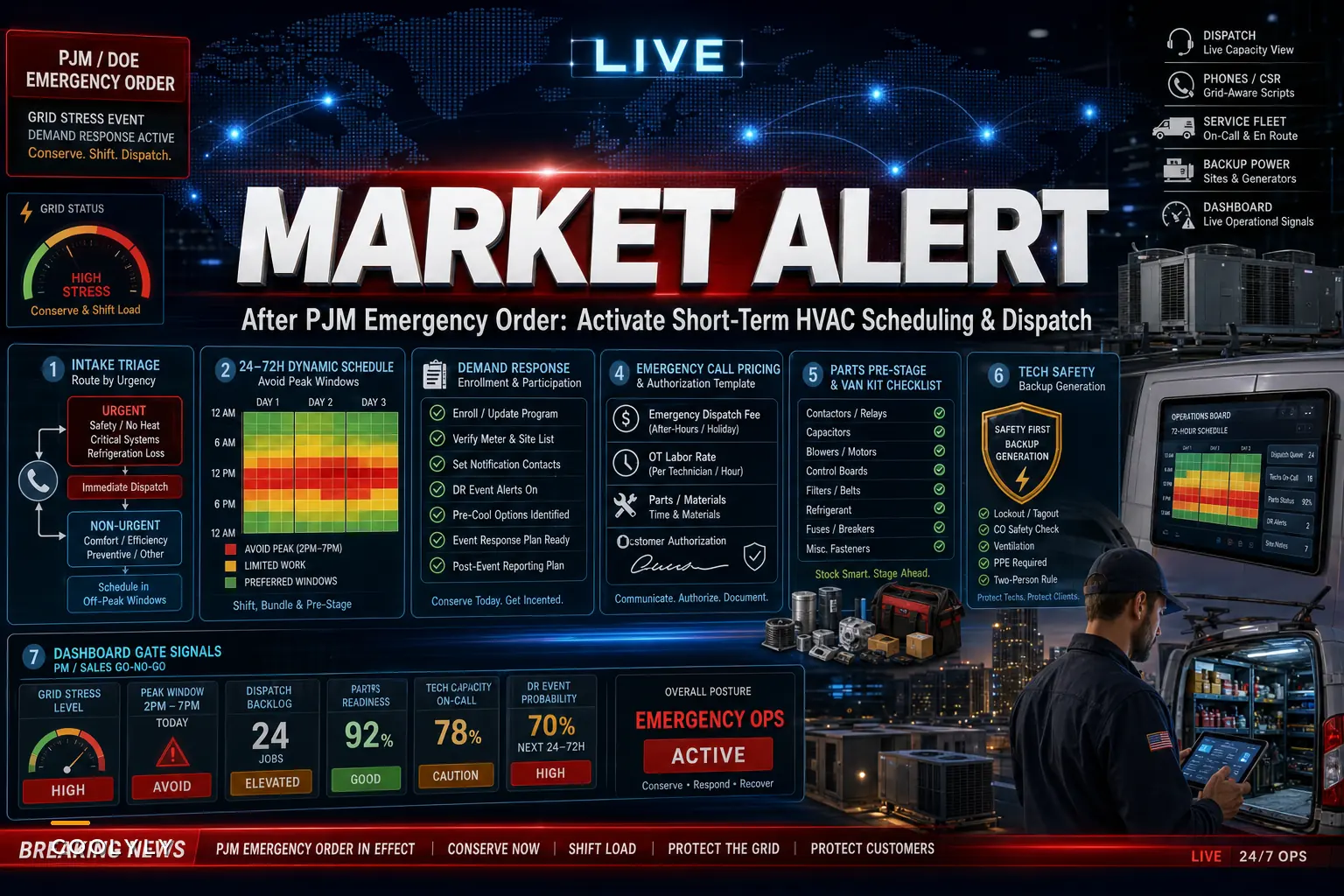

When the Department of Energy issued Emergency Order No. 202-26-50 on October 12, 2026, directing PJM to dispatch specific generating units and authorize backup generation through October 16, most HVAC owners filed it under "interesting but not my problem." That's the wrong read. The order itself is boring regulatory machinery. What it signals about your next 72 hours of dispatch is not.
For anyone who missed the details, the DOE's Section 202(c) order was prompted by unusually warm fall weather stacking on top of heavy planned generator and transmission outages — a combination that left capacity forecasts tighter than they should be in October. As the American Public Power Association reported, this was essentially PJM being told to keep reserves available by whatever means necessary across its 13-state-plus-D.C. footprint.
The operational translation: when the grid is this close to the edge, your customers' systems start behaving badly, emergency call volume jumps at the worst possible pricing hours, and your scheduling board — the one you built for a normal week — stops reflecting reality within hours. This post is about what you actually do during those windows.
Why a grid order shows up on your dispatch board before it shows up anywhere else
Grid stress doesn't announce itself to your call center. It arrives disguised as a cluster of "my AC won't keep up" and "my system keeps short-cycling" calls that spike late afternoon and into the evening — exactly when wholesale prices and demand are peaking.
-
Compressors and condensers work harder against warmer-than-normal ambient temps, pushing marginal equipment over the edge.
-
Voltage sags and brief interruptions during grid stress can trip controls, blow capacitors, and confuse smart thermostats — generating "no cool" calls that aren't really equipment failures.
-
Commercial customers on demand-response agreements or time-of-use rates suddenly want you to shift maintenance out of peak windows, mid-week, with no notice.
-
Your own operating costs tick up if your shop, warehouse, or any customer site is running backup generation.
The pattern that keeps repeating: the first 36 hours look like a normal busy spell, and then the board breaks. Technicians are already committed to routed PM work when the emergency calls start landing, and dispatchers end up making reactive swaps that blow up drive time and SLA clocks simultaneously.
The mistake isn't failing to predict the exact day — you can't. The mistake is not having a pre-defined "grid-stress mode" your operation can flip into when the signals line up.
The underlying problem: your schedule assumes a stable cost of delivery
Almost every dispatch and scheduling decision you make quietly assumes that the cost of doing a job at 2 PM is roughly the same as doing it at 6 PM. Labor rates might change for after-hours, sure, but the underlying cost of energy, the probability of a callback, and the customer's own cost exposure get treated as flat.
Eliminate scheduling chaos and missed jobs.
Coolyly helps HVAC companies book, coordinate, and track every service efficiently.
- Unified appointment & dispatch management
- Automated client notifications
- Technician scheduling & job tracking
No credit card required
-
A commercial customer on a time-of-use tariff may pay several times more to run a rooftop unit during a 4–8 PM peak than at 10 AM.
-
A rushed emergency diagnostic during a voltage event carries a materially higher callback risk, because the "fault" may clear itself once the grid stabilizes.
-
Your own after-hours truck roll during a surge costs more in overtime and burns a technician you'll need fresh the next morning.
When your scheduling logic ignores these swings, you make economically backwards decisions without realizing it. You send a tech out at peak to chase a fault that would've resolved on its own. You run a non-urgent PM during the exact window a customer is desperately trying to shed load. You rack up overtime on jobs that could've waited eight hours at a fraction of the cost.
This is the same structural weakness that shows up during curtailments and peak-rate events generally. If you want the broader framework for building this into your operation permanently, we went deep on it in our guide to preparing HVAC operations for grid curtailments and managing peak-rate windows. This post is the short-fuse, event-is-happening-now version.
The triage split that actually matters during a grid event
Normal triage sorts calls by urgency and SLA tier. During a grid-stress window, you need a second axis layered on top: is this a real equipment failure, or a grid-induced symptom that may self-resolve?
| Call type | Likely cause during grid stress | Best action | Why |
|---|---|---|---|
| No cool, system totally dead | Blown cap, failed contactor, tripped breaker | Dispatch — real failure | Won't self-resolve; genuine SLA exposure |
| System short-cycling / not keeping up | Undersized for extreme load + marginal components | Phone-screen first | May be load, not failure; prioritize by vulnerability |
| Thermostat acting erratic / blank | Voltage sag tripped controls | Guided customer reset | Often resolves without a truck roll |
| Commercial "shift our PM" request | TOU rate / demand-response participation | Reschedule off-peak | Low clinical urgency, high customer cost sensitivity |
| Repeated trip after resets | Underlying fault aggravated by grid condition | Dispatch, flag for return check | Real, but verify after grid stabilizes |
The phone-screen row is where most shops leak money. A well-trained CSR with a quick guided checklist can resolve a meaningful share of "not keeping up" and "thermostat blank" calls without a truck ever leaving the lot — but only if your team knows a grid event is live and has a script that accounts for it. Without that context, every call gets treated as a dispatch, and your most expensive hours fill with the least-necessary work.
One thing worth flagging: prioritize vulnerable customers honestly. An elderly resident or a medically sensitive household in an 85-degree home is not a "may self-resolve" situation — that's a dispatch regardless of grid economics. Build that override into your triage so cost logic never overrides safety logic.
A concrete 72-hour activation sequence
When an order like 202-26-50 lands with a defined window, here's a sequence that holds up under pressure. Adjust the timing to your market, but keep the order.
-
Confirm the window and your exposure. Identify which days are flagged, and pull your list of commercial accounts on time-of-use rates or enrolled in demand-response. Those are the accounts most likely to call you first.
-
Freeze non-urgent peak-window work. Pull discretionary PM and non-urgent sales appointments out of the projected peak hours (commonly late afternoon to early evening) for the flagged days. Rebook to mornings or to the day after the window closes.
-
Pre-stage high-failure parts. Load trucks heavier than usual on the parts that fail under thermal and electrical stress — run capacitors, contactors, dual-run caps, control boards, fuses. You will burn through these faster than a normal week.
-
Brief the phones with a grid-aware script. Give CSRs the reset/self-check flow and clear criteria for what gets dispatched versus screened. Make the vulnerable-customer override explicit.
-
Set an after-hours authorization flow. Decide in advance who can approve emergency truck rolls during peak, and what the pricing and authorization looks like. Don't improvise this at 7 PM on the hottest evening.
-
Stand up a shared capacity view. Everyone — dispatch, phones, managers — needs to be looking at the same live picture of committed versus available capacity, so no one promises a window the board can't keep.
-
Debrief after the window closes. What self-resolved? What did you dispatch that you shouldn't have? Which customers called about peak-rate concerns? Feed it into your next event.
Visualize this sequence as a simple workflow.
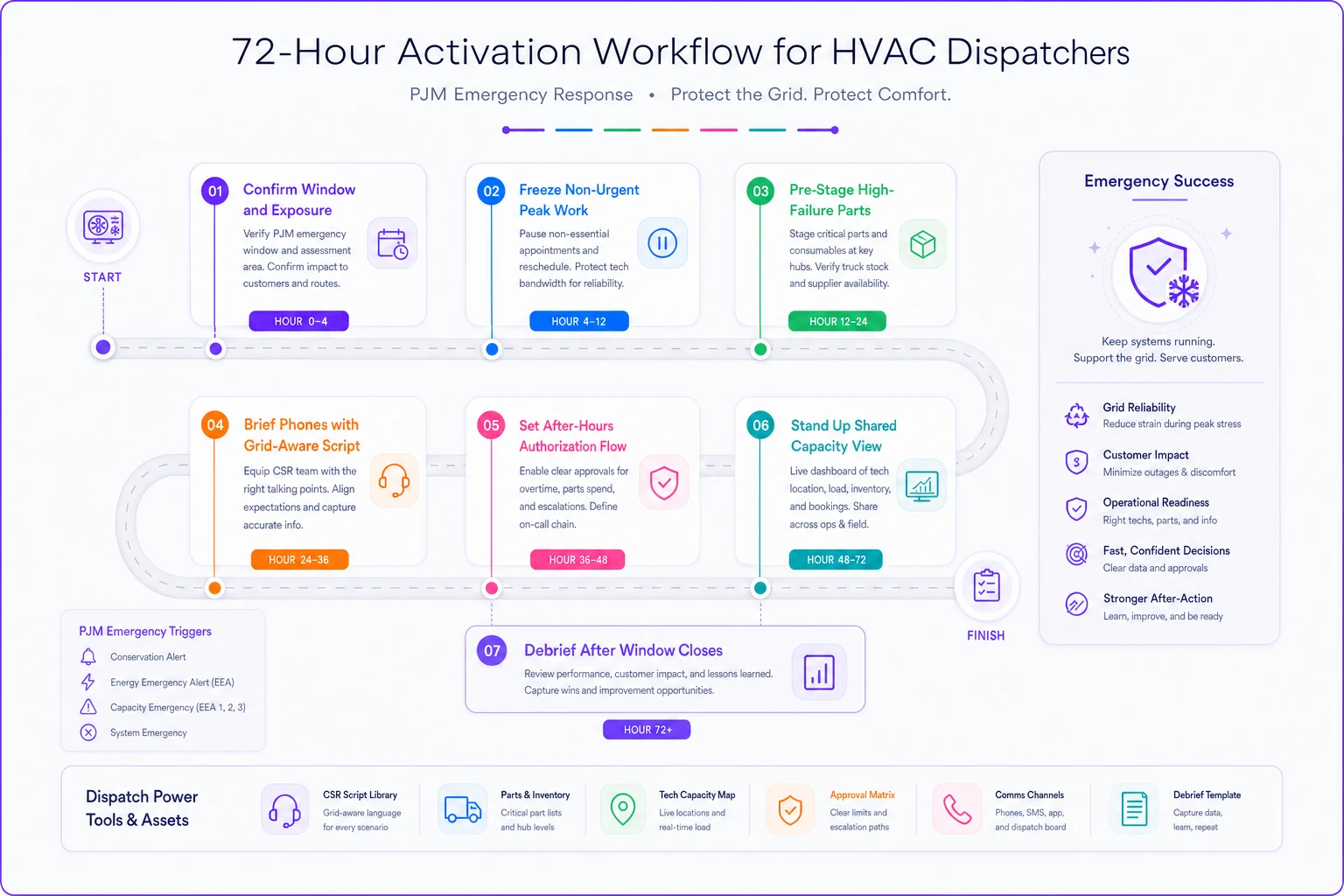
The debrief step gets skipped constantly, and it's the one that compounds. Each grid event is practice for the next, and the mid-Atlantic is going to see more of them.
A real scenario: the mid-size commercial-residential shop
Consider a shop running around 14 technicians across a suburban PJM territory, roughly a 60/40 residential-to-light-commercial mix. During a prior tight-grid stretch last summer, they ran their normal board straight into the event.
What happened: dispatchers reactively swapped PM jobs for emergency calls all afternoon. Drive time ballooned, two SLA windows on commercial accounts slipped, and they ran close to 11 hours of unplanned overtime across the team in a single evening — a lot of it chasing short-cycling calls that, in hindsight, were load-related rather than actual failures.
The following event, they ran a version of the sequence above. They froze discretionary PM out of the 4–8 PM window, pre-staged caps and contactors, and ran a grid-aware phone script. Overtime for the evening dropped to a few hours, phone screening deflected a solid chunk of the "not keeping up" calls, and both at-risk commercial SLAs held because the techs assigned to them weren't yanked onto emergency swaps.
Nothing dramatic — just a noticeably calmer, cheaper night with no SLA penalties. The difference wasn't working harder. It was deciding the rules before the window instead of during it.
Where scheduling systems earn their keep — and where they don't
A rule-driven scheduling and dispatch platform helps here mainly by doing three unglamorous things: holding a live capacity picture everyone trusts, applying pre-set rules automatically (like keeping discretionary work out of flagged windows), and surfacing which committed jobs are at SLA risk if reshuffling starts. When a dozen calls land in an hour, having the system flag conflicts and protect SLA-critical jobs automatically is the difference between controlled triage and a dispatcher guessing under fire.
What it won't do is make the judgment calls for you. The self-resolve-versus-real-failure distinction, the vulnerable-customer override, the pricing decision on an after-hours roll — those stay human. Good software narrows the chaos so your people can focus on decisions that actually need a brain, instead of manually reconciling a board that changed six times in the last hour.
When leaning hard on automated rules makes sense: multi-truck operations with real SLA exposure and recurring grid events. The coordination overhead is where you're bleeding.
When it's overkill: a two-or-three-truck shop where the owner is also the dispatcher and can hold the whole board in their head. At that scale, a solid phone script and a pre-staged truck get you most of the benefit.
The checklist to keep near the dispatch desk
Print this and keep it somewhere visible for the next PJM emergency window.
-
[ ] Flagged days and peak hours confirmed and posted
-
[ ] TOU / demand-response accounts identified and flagged in the system
-
[ ] Discretionary PM and non-urgent sales pulled from peak windows
-
[ ] Trucks pre-staged with extra caps, contactors, control boards, fuses
-
[ ] Grid-aware phone script in CSRs' hands, with self-check flow
-
[ ] Vulnerable-customer override clearly defined and communicated
-
[ ] After-hours authorization owner and pricing flow set
-
[ ] Shared live capacity view open for dispatch, phones, and managers
-
[ ] Customer comms templates ready for curtailment / peak-rate questions
-
[ ] Post-event debrief scheduled for the day after the window closes
Having this list visible matters less than having it filled out before the window opens. Once calls are landing and dispatchers are juggling, it's too late to be setting rules.
Closing thought
The PJM order itself will expire quietly, and most competitors will forget it happened. Grid stress in the mid-Atlantic isn't a one-off anymore — tighter reserves, more planned outages, and weirder shoulder-season weather mean these windows are going to keep coming. The shops that treat each one as a rehearsal, tightening their triage and scheduling rules a little more each time, will quietly pull ahead on cost control and SLA reliability while everyone else keeps running a normal board into an abnormal grid.
You don't need a perfect system. You need a decided one — rules set before the window, not during it.
Ready to optimize your HVAC operations?
Join hundreds of HVAC businesses using Coolyly to save time, improve technician utilization, and enhance customer satisfaction.