

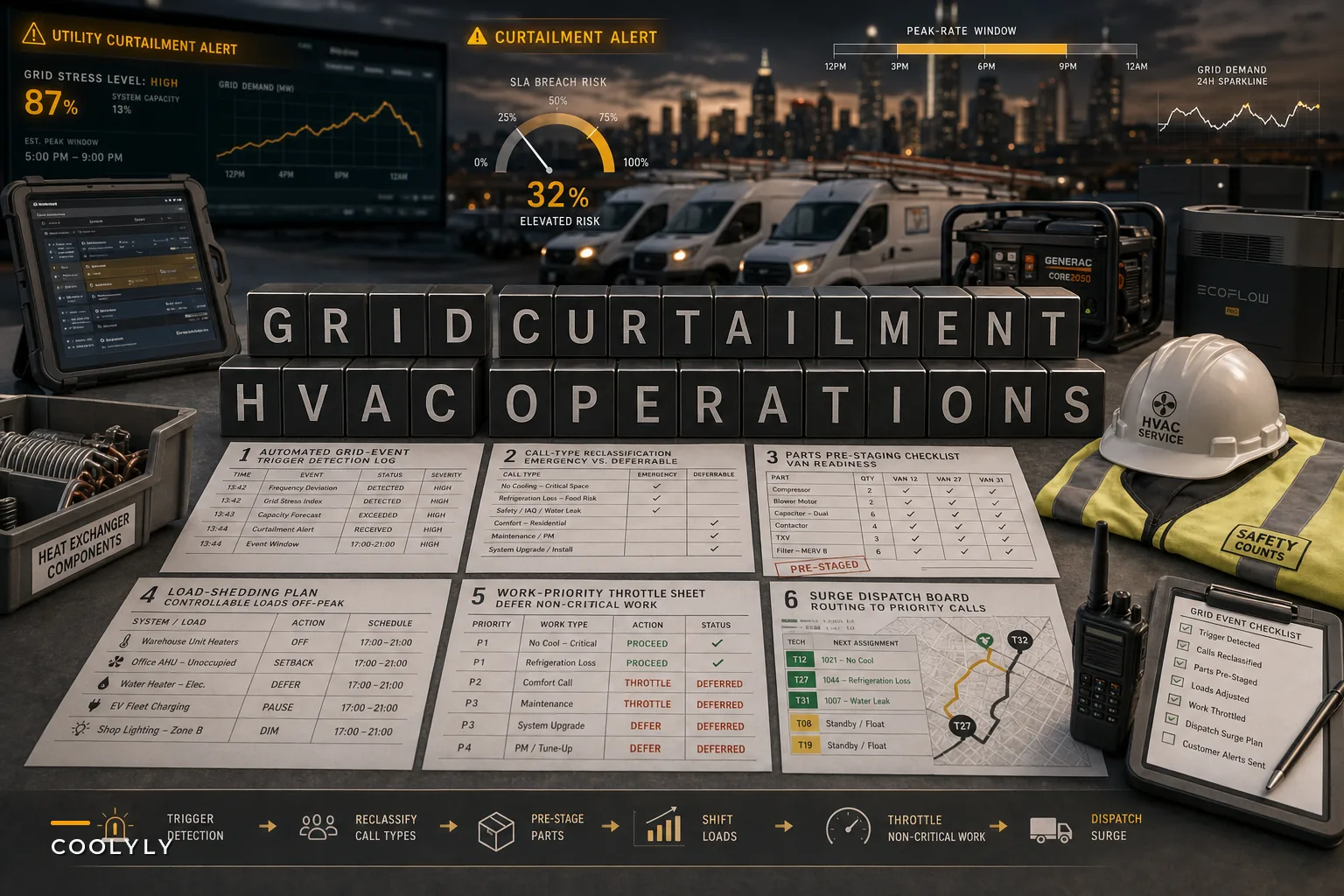

When PJM Interconnection—the operator coordinating the grid across a big chunk of the eastern U.S.—publicly asked large electricity users to pull back consumption during an unusually warm September, that wasn't just a utility press release. Reuters reported the appeal came as demand climbed and outage risk grew during peak hours. For most people, background noise. For an HVAC operation, it's a signal your next two weeks might look nothing like your forecast.
What most owners miss: the grid event itself isn't the problem. The problem is what it does to your phones, your routing, and your promise windows—usually all at once, usually faster than your dispatch process can absorb.
The chain reaction a curtailment sets off in your operation
The sequence matters more than any single event, so it's worth walking through what actually happens when a region gets a curtailment warning or rolling outage during a heat spell.
First, equipment that was already marginal starts failing. A compressor limping along at reduced capacity doesn't survive a voltage sag or a hard power cycle. The moment power flickers across a few neighborhoods, you get a wave of "it won't turn back on" calls—not spread out, but clustered in the same 90-minute window.
Second, customer expectations invert. On a normal day, a homeowner with a dead AC understands a two-day wait. During a grid event, that same homeowner has elderly parents in the house, it's 97 degrees inside, and the local news is running outage maps. Your standard service window suddenly feels like negligence to them, even though nothing about your capacity changed.
Third—and this is the one that quietly wrecks margins—your own costs shift. If you're running shop equipment, EV service vans on time-of-use charging plans, or supporting customers with backup generation, peak-rate windows change the math on when you do certain work. Charging a fleet of vans at 4 PM during a peak-rate event instead of 1 AM isn't a rounding error across a full month.
What tends to separate the shops that survive these days from the ones that don't isn't truck count. It's whether they have a pre-defined mode for curtailment conditions. Trying to run a grid-event day on a normal-day playbook usually means the board falls apart by 11 AM.
The real problem this exposes: your dispatch logic assumes a stable environment
Most HVAC scheduling—even decent scheduling—is built on predictability. You know roughly how many calls you'll get, your drive times, your tech availability. Grid events break all three at once.
Eliminate scheduling chaos and missed jobs.
Coolyly helps HVAC companies book, coordinate, and track every service efficiently.
- Unified appointment & dispatch management
- Automated client notifications
- Technician scheduling & job tracking
No credit card required
The deeper issue is that most shops have exactly one operating mode. There's no documented difference between how you dispatch on a calm 72-degree Tuesday versus a day when the grid operator is asking industrial users to throttle down. So when the hard day hits, decisions get made on the fly by whoever's manning the phones, and consistency goes out the window.
This connects directly to something we've written about before—the idea that resilience isn't a reaction, it's a pre-built capability. If you haven't thought through your operational resilience playbook, a grid curtailment is a brutal time to start. The shops that handle these days well have already decided, in writing, what gets triaged first and what gets pushed.
Building a "grid-event mode" for your dispatch
The fix isn't complicated, but it requires deciding things before you're under pressure. Think of it as a second operating mode you flip into when a curtailment warning lands.
-
Define the trigger. Decide what activates grid-event mode. A public curtailment appeal from your grid operator, a utility peak-rate notification, or an actual outage affecting more than X service areas. Don't leave it vague—name the signal.
-
Reclassify your call types. Under normal mode, a "no cooling" call and a "weak airflow" call might both get same-day treatment. In grid-event mode, they don't. You need a priority tier that puts vulnerable households, commercial accounts with hard SLAs, and total-failure calls at the top.
-
Pre-stage the parts that actually fail under power stress. Capacitors, contactors, control boards, and compressors fail disproportionately during voltage events. Kitting these ahead of a forecasted warm spell means your techs aren't driving back to the shop mid-surge.
-
Shift controllable load off peak windows. Fleet charging, shop HVAC, any non-urgent bench work—move it out of the peak-rate hours. Easiest money you'll save all season.
-
Set a throttle rule for non-critical work. Tune-ups, filter swaps, non-urgent PM visits—proactively reschedule these with a courtesy call, not cancel them last-minute.
Here's a quick visual of the mode switch workflow.
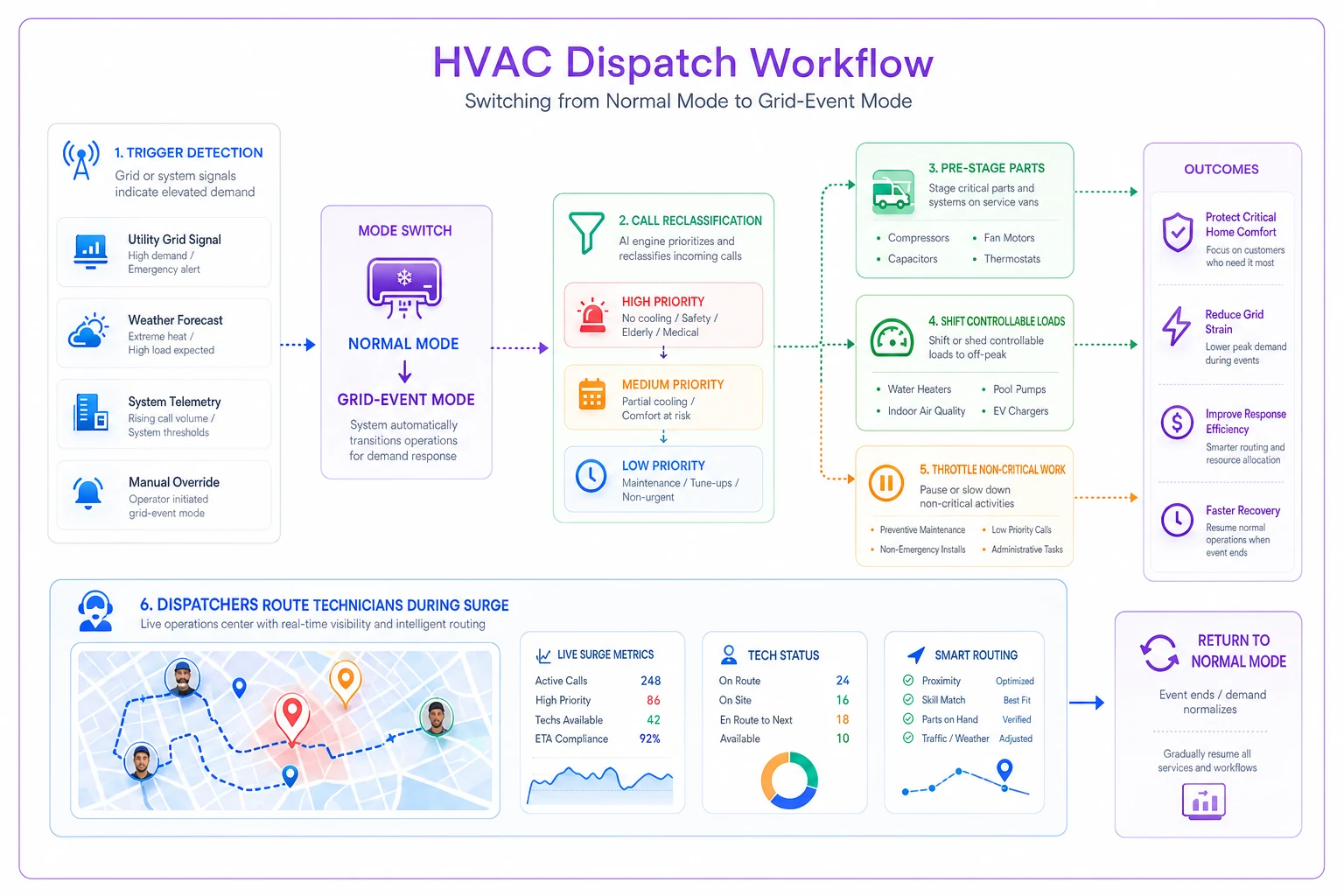
Pre-stage a small failure-parts kit on every van when a warm spell is forecast so techs avoid mid-surge return trips.
That fifth point is where most shops flinch. It feels bad to push a loyal PM customer. But calling ahead is a completely different experience than no-showing them because an emergency ate their slot.
Triage priorities when the board overflows
During a curtailment-driven surge, the question isn't "who called first." It's "who can't wait." Here's a rough framework for how calls should stack up when you're resource-constrained:
| Call type | Normal-day priority | Grid-event priority | Why it shifts |
|---|---|---|---|
| Vulnerable household (elderly, infant, medical) | Same-day | Top tier, immediate | Health risk compounds with heat and outage |
| Commercial account with contractual SLA | Scheduled per contract | High—SLA breach carries penalties | Grid outage doesn't pause the contract clock |
| Total residential system failure | Same-day | High, after vulnerable/SLA | Habitability concern during heat |
| Partial cooling / reduced performance | Same-day | Deferred to next available | Uncomfortable but not urgent |
| Routine PM / tune-up | Scheduled | Proactively rescheduled | Low urgency, frees capacity |
| Non-urgent install follow-up | Scheduled | Deferred | No immediate customer harm |
The nuance worth flagging is the commercial SLA line. A grid outage often gets treated by clients as your problem even when the power loss wasn't your fault. If your service agreements don't have clear language about grid-driven events, you're absorbing risk you never agreed to. Worth reviewing those contracts before the next warm stretch, not after a penalty lands.
Technician safety and routing during actual outages
This part gets skipped and it shouldn't. When neighborhoods are dark or power is cycling, your techs are working on equipment with unstable electrical conditions. A system that's "off" during a rolling blackout can energize without warning when the grid comes back.
-
Confirm with the customer whether their outage is a utility outage or an equipment failure before dispatching. You don't want a tech driving 40 minutes to diagnose a problem that resolves the moment the block gets power back.
-
Set a lockout expectation
techs verify power status and follow proper lockout procedures given the real risk of unexpected re-energizing.
-
Build buffer into routing. Traffic signals go dark during outages, drive times balloon, and a route built on normal-day assumptions will have your last tech finishing two hours late.
That last point is easy to overlook until it bites you. Grid-event days are when batching and drive-time estimates break down. If your routing assumes normal traffic flow, it's wrong the moment signals go out across a corridor.
Where this becomes a revenue opportunity instead of just a cost
There's a quieter angle here that better-run shops are already acting on. Grid instability creates genuine demand for priority and backup service tiers.
Commercial clients—especially anyone with temperature-sensitive operations like restaurants, data closets, or medical facilities—will pay for guaranteed response during grid events. A priority-service tier that commits to a defined response window during curtailments is something customers actively want when the grid gets shaky. It's not gouging; it's pre-committing your capacity to the people who value it most.
When this makes sense
If you operate in a region that gets repeated curtailment warnings or peak-demand stress—which is a growing number of markets—a priority tier is worth building.
It smooths your demand, pre-funds your preparedness, and gives commercial accounts a reason to stay.
When it's a bad idea
If you can't actually deliver on the response commitment, don't sell it.
A priority tier you breach during the exact event the customer bought it for is worse than never offering it. Only commit capacity you've genuinely reserved.
A real scenario
A mid-sized residential-and-light-commercial shop in a curtailment-prone market—around 14 techs, somewhere in the range of 330–360 calls in a busy summer week—kept getting wrecked by heat-plus-grid days. On the worst of them: phones ringing constantly, techs scattered across bad routes, two or three commercial SLA breaches they'd eat in credits.
What changed wasn't headcount. They built a documented grid-event mode: a defined trigger, a re-ranked triage list, a pre-staged failure-parts kit loaded onto vans whenever a warm spell was forecast, and a proactive rescheduling script for PM customers. Fleet charging moved fully off peak-rate windows.
The results over the following season were uneven but real. SLA penalty hits on grid days stopped. PM customers stopped feeling abandoned because they got advance notice instead of no-shows. The off-peak charging shift alone trimmed a few hundred dollars a month off the power bill. No single number is dramatic. But across a summer with a half-dozen curtailment events, the difference between chaos and a controlled day was substantial.
A quick readiness checklist
Before your region's next warm spell, run through this:
-
You have a named trigger that activates grid-event mode
-
Your triage tiers are documented, not improvised
-
Power-stress failure parts are kitted and ready to load
-
Controllable load (charging, shop equipment) is scheduled off peak
-
PM customers have a proactive rescheduling script, not last-minute cancellations
-
Commercial SLA language addresses grid-driven events
-
Techs have a clear re-energizing/lockout protocol for outage conditions
-
Routing buffers account for dark signals and heavier drive times
Grid curtailments aren't a weather story—they're an operational stress test. They expose whether your shop has one rigid mode or the ability to shift gears deliberately when conditions change.
The underlying point
Grid curtailments aren't a weather story—they're an operational stress test. They expose whether your shop has one rigid mode or the ability to shift gears deliberately when conditions change.
The shops that get hurt treat each event as a surprise. The ones that handle it have simply decided, ahead of time, what a hard day looks like and how they'll run it. That decision is cheap to make in advance and expensive to make at 11 AM with forty calls stacked up and the power flickering.
The shops that get hurt treat each event as a surprise. The ones that handle it have simply decided, ahead of time, what a hard day looks like and how they'll run it. That decision is cheap to make in advance and expensive to make at 11 AM with forty calls stacked up and the power flickering.
Ready to optimize your HVAC operations?
Join hundreds of HVAC businesses using Coolyly to save time, improve technician utilization, and enhance customer satisfaction.