

Your dispatch software doesn't talk to your inventory system. Your CRM duplicates customer records every time a tech updates something in the field. Your smart thermostats collect mountains of data that nobody ever looks at. And somehow, your accounting software shows different revenue numbers than your service management platform.
Sound familiar? Most HVAC companies end up here eventually. You start with QuickBooks and maybe a basic scheduling tool. Then you add a CRM because tracking customers in spreadsheets gets messy. Someone convinces you to get fleet tracking. Your techs want a mobile app. Before long, you're running seven different systems that barely communicate, and your office manager spends half their day copying data between platforms.
The real problem isn't the number of tools. It's that nobody planned the architecture. Each system got added to solve one specific problem without thinking about how it fits into the bigger operational picture. Now you're stuck with what I call "integration debt" – the hidden cost of maintaining disconnected systems that should be working together.
Why HVAC companies hit the integration wall
The organic growth trap
HVAC businesses rarely start with a master technology plan. You're focused on getting trucks rolling and keeping customers happy, not designing data architecture. So your tech stack grows organically – one urgent need at a time.
First you need better scheduling than paper calendars. Then customer history becomes important, so you add a CRM. Equipment tracking matters for maintenance contracts, so that becomes another database. Each addition makes sense in isolation. But around year three or four, usually when you hit 8-10 techs, the cracks show up.
Your dispatcher starts noticing that customer addresses in the CRM don't match what's in the dispatch system. Your inventory counts are always off because techs update the wrong system. Service history lives in three different places and nobody trusts any of them completely. This is when most owners realize they need actual HVAC integrations data architecture, not just more software.
The false economy of point solutions
Vendors selling "simple" solutions that create complex problems is one of the more frustrating patterns in this industry. That $49/month scheduling app seems like a bargain until you realize it can't share data with anything else. Now your scheduler manually enters every appointment twice – once for scheduling, once for billing.
A residential HVAC company in Phoenix running 14 trucks had six different software systems, none of which talked to each other. Their office staff spent roughly 15 hours per week just moving data around. At $25/hour fully loaded, that's around $19,500 a year in pure waste. The owner thought he was saving money with cheaper point solutions. He was actually burning the equivalent of a part-time employee's salary on manual data entry.
And the real cost isn't just labor. It's the mistakes that happen when humans become the integration layer. Double-booked appointments because the scheduler checked the wrong calendar. Lost equipment history because the tech updated the wrong customer record. Inventory shortages because nobody reconciled three different counts. These errors compound over time.
Building your integration priority matrix
Start with data ownership clarity
Eliminate scheduling chaos and missed jobs.
Coolyly helps HVAC companies book, coordinate, and track every service efficiently.
- Unified appointment & dispatch management
- Automated client notifications
- Technician scheduling & job tracking
No credit card required
Before connecting anything, you need to establish which system owns which data. This sounds bureaucratic, but it prevents the sync conflicts that plague most integrations.
Customer Master Data: Your CRM should be the single source of truth for customer information – names, addresses, contact info, and communication preferences. Everything else pulls from here.
Service History: Your service management platform owns job records, equipment details, and technical notes. The CRM might display this data, but it shouldn't store its own version.
Financial Records: Accounting software owns invoices, payments, and financial reporting. Other systems can reference invoice numbers but shouldn't try to replicate financial data.
Inventory Counts: Either your service platform or a dedicated inventory system owns current stock levels. Pick one. Having multiple systems track inventory independently guarantees discrepancies.
Schedule State: Your dispatch system owns the current schedule and tech availability. Calendar integrations should be read-only mirrors, not independent schedule sources.
When two systems both think they own the same data, you get conflicts. The customer's address gets updated in the CRM but not dispatch. A payment gets recorded in QuickBooks but the service platform still shows an open invoice. These conflicts multiply until nobody knows which system to trust.
The integration sequence that actually works
Don't try to connect everything at once. There's a natural order that minimizes disruption and delivers value faster:
-
Phase 1
CRM to Dispatch (Weeks 1-2)
— Start here because customer data flows through everything. Get your customer records clean and syncing properly before adding complexity. This alone eliminates most duplicate entry and reduces booking errors by around 40% based on what I typically see. -
Phase 2
Dispatch to Mobile (Weeks 3-4)
— Your techs need real-time schedule updates and the ability to capture job data in the field. This integration directly impacts daily operations. You'll see immediate improvements in job completion times and data accuracy. -
Phase 3
Service to Accounting (Weeks 5-6)
— Financial sync comes next because it affects cash flow. Invoices should flow automatically from completed jobs to your accounting system. This eliminates billing delays and reduces accounts receivable aging. -
Phase 4
Inventory to Service (Weeks 7-8)
— Once your core workflow is connected, add inventory tracking. Parts used on jobs should automatically deduct from stock. This visibility prevents truck stock-outs and enables smarter purchasing. -
Phase 5
Sensors and IoT (Weeks 9-12)
— Smart thermostats and equipment sensors come last. This data is valuable for predictive maintenance programs, but it's not mission-critical for daily operations. Wait until your foundation is solid.
Visualizing the phases can help your team understand sequencing and handoffs.
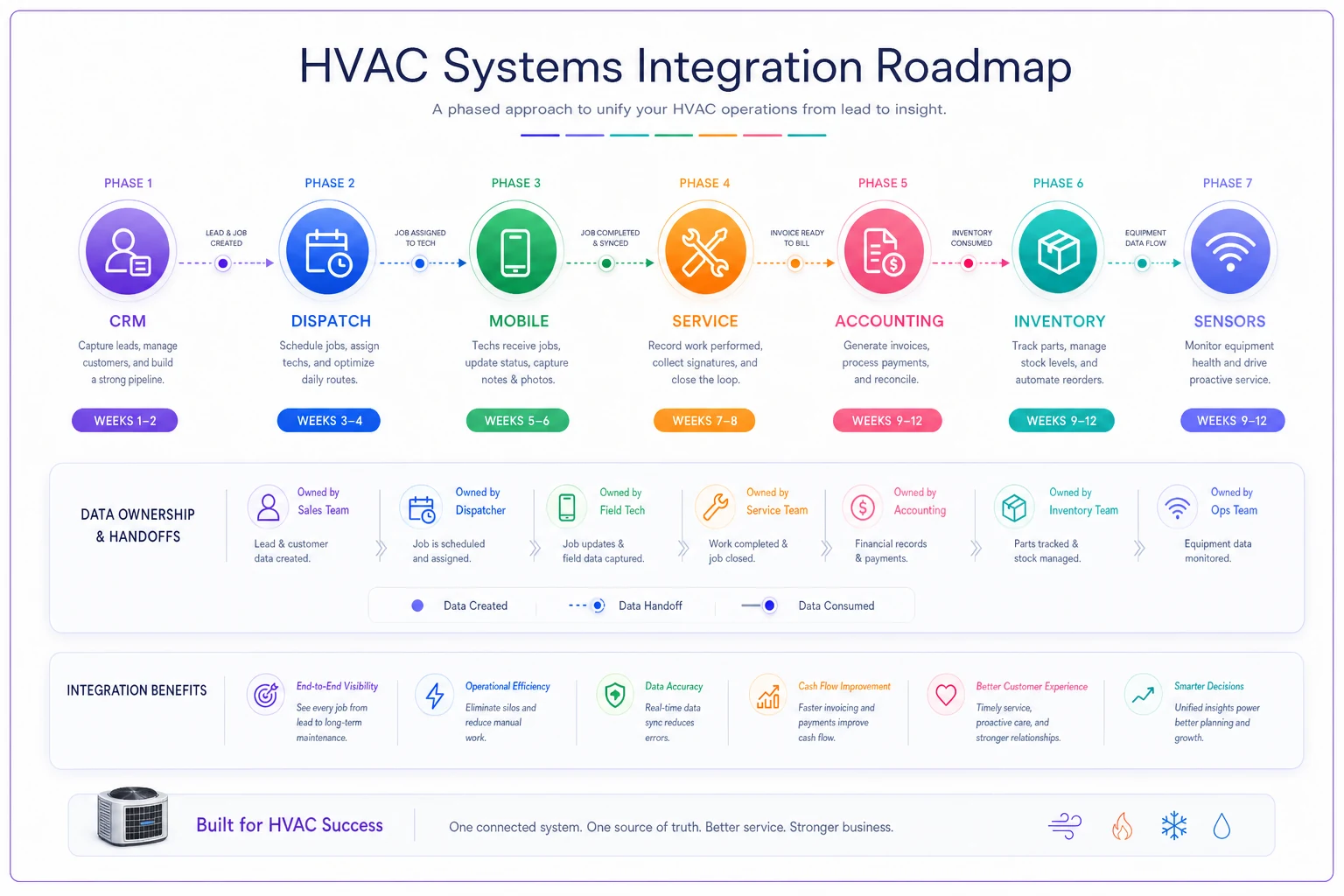
Keep the sequence tight and test each phase before moving to the next to avoid cascading issues.
Managing sync conflicts and data consistency
Common conflict patterns in HVAC operations
Every integration eventually hits sync conflicts. A tech updates a customer's phone number in their mobile app while someone else changes the address in the CRM. Which update wins? Without clear rules, you get data chaos.
The most destructive conflicts happen around scheduling. Picture this: your dispatcher moves a 2 PM appointment to 3 PM in the dispatch system. At the same time, the customer calls and your CSR reschedules it to tomorrow using the CRM's scheduling feature. Both systems try to update the master schedule. If you're lucky, one update fails and someone notices. If you're not, you end up with two different appointments for the same job, and nobody knows until an angry customer calls.
Price and invoice conflicts create different headaches. A tech applies a discount in the field using their mobile app. The office processes the standard invoice from the work order. Now you have two different amounts for the same job. The customer gets an incorrect bill, payment processing fails, and your books don't balance.
These aren't edge cases. They happen weekly in most integrated environments unless you build explicit conflict resolution rules.
Practical conflict resolution rules
Last-write-wins is usually wrong. Most default integrations use simple timestamp logic – whatever changed most recently becomes the truth. This works poorly for HVAC operations where field and office updates have different authority levels.
-
Field updates to job status and completion data override office entries
-
Office updates to scheduling and customer data override field changes
-
Financial adjustments require manager approval regardless of source
-
Inventory adjustments from completed jobs process immediately; manual adjustments queue for review
Build in sanity checks for critical data. If an address change would move a customer more than 50 miles, flag it for review. If a price adjustment exceeds 20%, require approval. These guards catch both sync errors and human mistakes.
Handling latency in distributed systems
Real-time sync sounds great until you realize what it costs. True real-time integration means every change triggers immediate updates across all connected systems. For a 10-truck operation, this can mean hundreds of sync operations per hour. Your systems slow down, API rate limits kick in, and suddenly your "real-time" integration is dropping updates.
| Sync Tier | Data Type | Frequency | Reason |
|---|---|---|---|
| Critical | Schedule changes, emergency calls, job completions | 1–2 minutes | Affects immediate field operations |
| Standard | Customer data, notes, equipment details | Every 15–30 minutes | Fast enough to prevent issues without overloading |
| Analytical | Historical reports, performance metrics, sensor readings | Overnight batch | Nobody needs real-time access to last month's revenue |
This tiered approach reduces system load by roughly 70% while maintaining operational effectiveness. Your dispatchers get the speed they need without overwhelming your integration infrastructure.
Sensor data and IoT integration strategy
Making smart equipment data actionable
That smart thermostat data sitting in the manufacturer's cloud isn't helping your business. Most HVAC companies have customers with connected equipment but no way to use that information operationally.
The challenge isn't getting the data – most manufacturers offer APIs now. It's figuring out what to do with thousands of temperature readings, filter status updates, and error codes streaming in daily.
Focus on three actionable data points:
Runtime anomalies: A system running 18 hours a day in mild weather indicates problems. This triggers proactive service opportunities.
Setpoint patterns: Customers constantly adjusting temperatures might need system upgrades or education. This identifies upsell opportunities that actually help customers.
Error code patterns: Catching soft errors before they become failures reduces emergency calls and builds customer trust.
The key is that this data needs to flow into your existing workflows, not create new ones. When a smart thermostat detects excessive runtime, it should automatically create a service opportunity in your system – not just send an alert everyone ignores.
Building automated response workflows
Sensor integration without workflow automation just creates noise. One commercial HVAC contractor connected 200+ smart thermostats to their monitoring platform. Within a month, they turned off all alerts because the constant notifications became overwhelming. The data was there, but it wasn't actionable.
The fix is building response workflows that match your operational capacity.
Filter the signal from noise first. Not every alert needs human attention. A temperature variance of 2 degrees doesn't matter. A system short-cycling 20 times per hour does. Set thresholds that reflect actual service needs.
Route to the right person automatically. Maintenance contract customers get priority routing. Warranty issues go to specific techs. Emergency indicators bypass normal scheduling. This happens automatically based on rules you define.
Batch non-critical responses. That filter reminder doesn't need immediate action. Batch these into monthly service routes that make geographic sense. One truck can handle 10-12 filter changes in a day if they're properly clustered.
A residential HVAC company in Atlanta implemented this approach with roughly 450 connected systems. They catch about 30 issues monthly before they become emergency calls. Average ticket value increased from around $280 to $340 because techs arrive knowing what's wrong. More importantly, their maintenance contract retention went from 72% to 85% because customers see the proactive value.
Phased implementation checklist
Weeks 1-2: Foundation setting
Start with data cleanup before connecting anything. Rushing into integration with messy data means spending months untangling a replicated mess.
First, audit your customer database. Deduplicate records, standardize addresses, and verify phone numbers. One company found 30% of their customer records had duplicates – some customers existed five times across different systems. Each duplicate meant potential scheduling conflicts and billing errors.
Next, establish your data governance rules: who can edit customer master data, what fields are required versus optional, how to handle conflicting updates, and what the escalation path looks like for data issues. Document these rules somewhere everyone can access them. Your team needs to understand why data hygiene matters and how to maintain it.
Finally, set up your integration staging environment. Never test integrations on production data. Clone your current systems, connect them in staging, and work out the kinks there. This prevents the "we broke everything" panic that happens when testing in production goes wrong.
Use realistic data volumes in staging to catch mapping and performance issues before they hit production.
Weeks 3-4: Core workflow connections
Now connect your primary operational flow: CRM to dispatch to mobile. This is where you'll see immediate operational improvement.
-
Customer data flows from CRM to dispatch
-
Job assignments flow from dispatch to mobile
-
Completion data flows from mobile back to dispatch
Test with a small group first – maybe 2-3 techs running 20-30 calls total. Watch for data arriving incomplete or corrupted, sync delays causing operational issues, users confused by interface changes, and edge cases your testing didn't catch.
Common issues you'll hit: address formatting differences between systems, custom fields that don't map properly, and status values that don't align. Fix these in staging before rolling out widely.
Weeks 5-8: Financial and inventory integration
With your core workflow stable, add the money flow. Connect service completion to invoicing, then invoicing to payment processing.
The sequence matters here. Don't connect payment processing until invoicing flows cleanly. Otherwise you'll process payments for incorrect amounts and spend weeks reconciling the mess.
For inventory integration, start with high-value parts only. Track your top 20-30 SKUs that represent 80% of your parts cost. Get this working smoothly before adding the hundreds of small parts that barely impact your bottom line. This focused approach reduces complexity while capturing most of the value.
Build reconciliation reports immediately. You need to know when system counts don't match physical counts. Run these weekly at first, then monthly once the system stabilizes.
Measuring integration ROI
Data entry hours: Measure how many hours per week your staff spends on duplicate entry before and after integration. A proper integration typically cuts this by 60-70%. For a company with 3 office staff, that's often 10-15 hours per week recovered.
Error rates: Count scheduling conflicts, billing errors, and inventory discrepancies. Good integration reduces these by roughly half within the first month.
Response time: Measure how quickly you can answer customer questions about service history, equipment details, or billing. When data lives in one accessible place instead of scattered across systems, response time drops from minutes to seconds.
The real ROI shows up in places you might not measure directly. Your CSRs sound more professional when they have complete customer history at their fingertips. Techs complete more jobs per day when they're not waiting for information. Service opportunities get identified automatically from equipment data instead of being missed.
One multi-location HVAC contractor tracked their metrics carefully through integration. They recovered roughly 25 hours of staff time weekly, reduced billing errors from about 8% to 2%, and increased first-call resolution by 30%. The integration paid for itself in four months through labor savings alone, not counting the revenue impact from better operations.
When integration complexity becomes dangerous
Signs you've over-integrated
Sometimes less is more. Companies that try to connect everything to everything end up with integration nightmares. More connections mean more failure points, more maintenance, and more complexity when something breaks.
Watch for these warning signs: your team spends more time troubleshooting integrations than using them; nobody can explain the data flow anymore; small changes require massive testing across systems; screen loads noticeably slow down because every request triggers five API calls.
The solution isn't disconnecting everything. It's strategic decoupling. Keep core integrations that directly impact operations. Question everything else. That social media monitoring integration? Probably unnecessary. The chatbot pulling from seven different systems? Might be creating more problems than it solves.
The hidden cost of sync delays
Every integration has latency, but cumulative delays create real operational problems. A customer calls to reschedule. The CSR updates the appointment in the CRM, which takes 5 minutes to sync to dispatch. Dispatch takes another 5 minutes to update the mobile app. Meanwhile, the tech is already driving to the original address.
Multiply this across dozens of daily changes and your office thinks everyone has current information while the field operates on data that's 10-15 minutes old. This gap causes missed appointments, wasted drive time, and frustrated customers.
The fix isn't always faster syncing. Sometimes it's operational adjustments. Implement a "changes freeze" window – no schedule modifications within 2 hours of appointment time unless it's an emergency. Train CSRs to verbally confirm critical changes with dispatch. Build buffer time into your schedule to absorb sync delays.
Practical governance for multi-system environments
Who owns what when systems fail
Every integration will break eventually. API changes, network issues, or simple bugs will disrupt your data flow. Without clear ownership, these failures create chaos.
Establish escalation paths before problems hit:
Level 1: Operational workaround (0-30 minutes) Front-line staff need documented manual processes for when integrations fail. Can't sync to dispatch? Here's the manual entry process. Mobile app not updating? Here's how to call in job completions. These workarounds keep operations running while technical teams investigate.
Level 2: Technical investigation (30 minutes – 4 hours) Your internal tech lead or integration admin investigates the failure. They determine if it's a configuration issue, a temporary outage, or something requiring vendor support. This person needs access to all systems and integration logs.
Level 3: Vendor escalation (4+ hours) For persistent issues, you need direct vendor contacts who understand your integration architecture. Generic support won't help when complex integrations fail. Maintain relationships with technical contacts at each vendor who can investigate API-level issues.
Document every integration failure and its resolution. Patterns emerge quickly. That CRM-to-dispatch sync that fails every Monday morning? Probably a weekend batch job conflicting. The inventory sync that breaks monthly? Likely tied to your billing cycle. These patterns help you prevent failures instead of just reacting to them.
Audit trails and compliance requirements
HVAC companies deal with warranty requirements, insurance claims, and increasingly, environmental regulations. Your integrated systems need to maintain audit trails that stand up to scrutiny.
Every data change needs attribution – who changed what, when, and ideally why. This gets complex with integrations because changes flow between systems automatically. A field update in the mobile app triggers changes in dispatch, which updates the CRM, which notifies accounting. If something goes wrong, you need to trace that chain.
Build these audit capabilities from the start: log all integration transactions with timestamps and data payloads, maintain source system attribution for every change, archive logs for at least 3 years (some warranties require 10-year history), and test your audit trail by tracing a sample transaction monthly.
This matters more than most owners realize. Warranty claims get denied because companies couldn't prove when equipment was installed or maintained. Insurance companies question claims without clear incident documentation. Tax audits fail because financial records don't match operational data. Your integration architecture needs to support these requirements, not undermine them.
Most HVAC companies treat integrations as a technical problem to get through – connect system A to system B, hope nothing breaks, move on. The companies actually pulling ahead treat their HVAC integrations data architecture as a strategic asset.
When your systems work together properly, everything speeds up. Dispatchers schedule more efficiently because they see the full picture. Techs complete more calls because they have the information they need. Invoices process faster because data flows automatically. Customers get better service because their history is instantly accessible.
The biggest mistake is waiting for the perfect solution. There isn't one. Start with the integration points that cause the most daily friction. Fix those, learn from the process, then expand gradually. Your architecture will evolve as your business grows – that's not a problem, that's just how this works.
What matters is starting with clear data ownership, realistic sync expectations, and operational workflows that account for integration realities. Build from there, measuring actual impact instead of hoping for improvement.
Your competition is either struggling with disconnected systems or overpaying for monolithic solutions that don't fit HVAC operations. A thoughtfully integrated tech stack – one that uses AI-powered automation to handle the routine, repetitive work – gives you an edge they can't easily replicate. Better data, faster operations, happier customers. That's the real value of getting your integration architecture right.
Ready to optimize your HVAC operations?
Join hundreds of HVAC businesses using Coolyly to save time, improve technician utilization, and enhance customer satisfaction.