


The residential side of HVAC forgives sloppy scheduling. A homeowner is home, the address is right, you knock, you work. Commercial jobs punish it. A tech shows up at a distribution center at 7 a.m. for a rooftop unit, and the guard has no work order on file, the badge request expired, the escort left for the day, and the roof hatch is locked behind a facilities manager who's out until Thursday. Two hours of drive time and labor — gone. Then the client disputes the trip charge because "nobody could get in anyway."
That's the pattern this article is about. Not scheduling in general — the pre-visit validation layer specifically, where commercial HVAC work either gets clean access or turns into a wasted roll and a charge-back fight three weeks later.
Where commercial access actually breaks
Access failures almost never come from the tech. They come from information that was true when the job was booked and false by the time the truck arrived. Commercial sites have moving parts that residential doesn't: rotating security vendors, tenant-vs-landlord access rules, insurance certificate expirations, escort requirements, permit windows.
The uncomfortable part is that most of these failures are visible days in advance. The COI expired last month. The badge takes 48 hours to provision and someone requested it the morning of. The permit was pulled but the inspection hold wasn't cleared. Nobody looked, because nobody owned the looking.
A mid-size commercial shop running 40–50 commercial PM and service visits a week will typically lose two to four of them to access problems. That doesn't sound catastrophic until you price it out — drive time, tech hour, the return trip, and the disputed invoice that eats admin time to resolve. Call it $400–$700 per failed visit once you count the second roll.
Dispatchers usually know it's happening. What they don't have is a repeatable gate that stops a job from being "ready to dispatch" until access is actually confirmed.
The core idea: nothing gets dispatched until it clears the gate
More phone calls just move the chaos around. The fix is a checklist-led SOP with a hard gate: a commercial job cannot move to "dispatch-ready" until every access and billing condition is verified and stamped.
Eliminate scheduling chaos and missed jobs.
Coolyly helps HVAC companies book, coordinate, and track every service efficiently.
- Unified appointment & dispatch management
- Automated client notifications
- Technician scheduling & job tracking
No credit card required
Think of it as three checkpoints, each owned by a specific person, each with a pass/fail state:
-
Pre-visit validation (24–72 hours out)
-
Day-of supervisor handoff (morning of)
-
Billing trigger confirmation (before and after the work)
If any checkpoint is red, the job doesn't roll. It goes back to a coordinator to fix or reschedule. The discipline is in refusing to dispatch a yellow job "and hope it works out."
Here's a simple visual of the gate workflow.
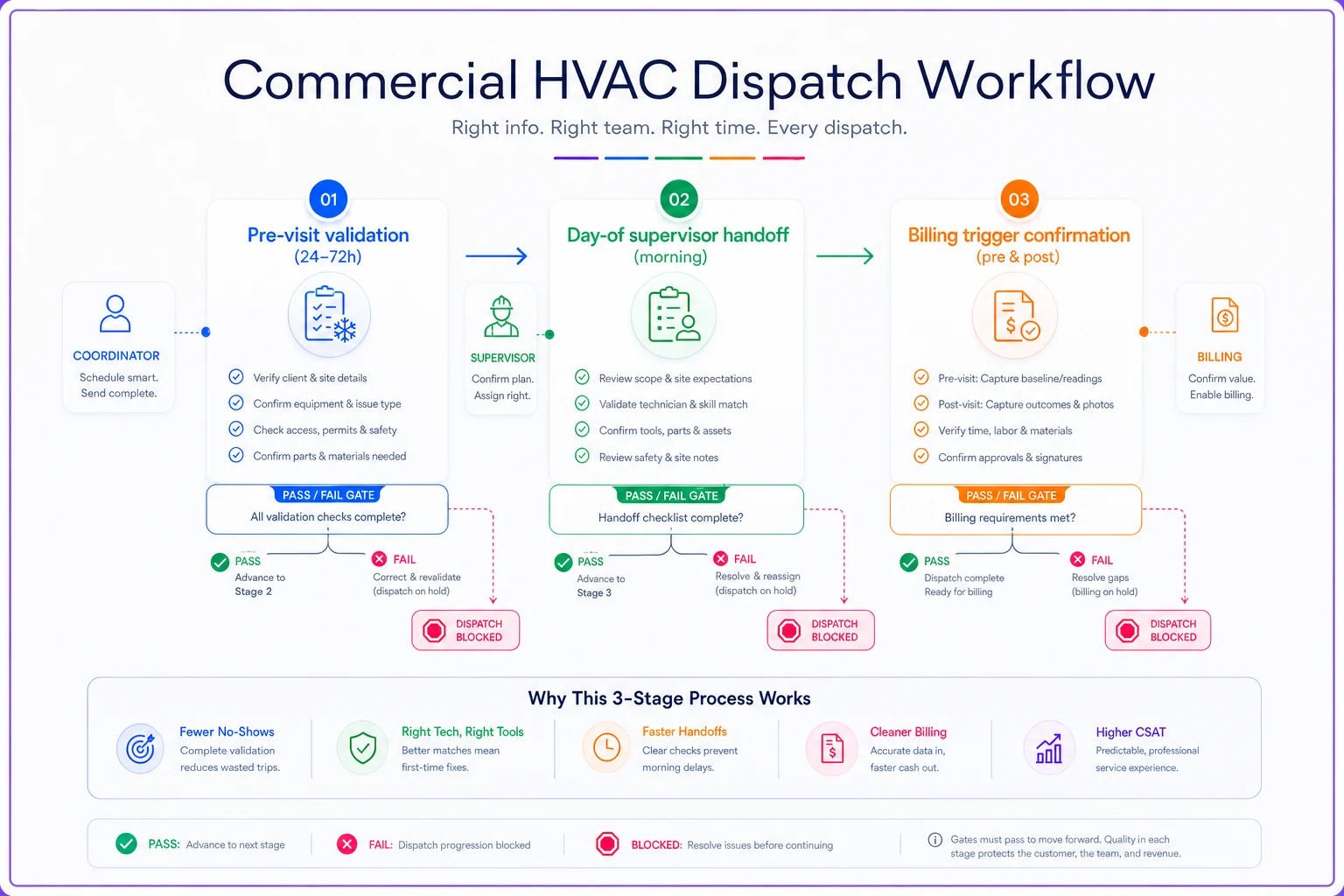
This connects to the broader logic behind a rule-driven HVAC dispatch and scheduling system — access validation is just one more rule that has to clear before a job is eligible to schedule.
Checkpoint 1: Pre-visit validation
This checkpoint saves the most money because it happens early enough to actually fix things. Run it 24–72 hours before the visit, depending on how long the slowest credential takes to provision.
The pre-visit checklist should confirm:
-
Site contact reached and confirmed — a named person, not a general line, who acknowledges the visit date and window
-
Access method verified — badge, escort, key, lockbox code, or gate code, and who holds it day-of
-
Escort requirement confirmed — many industrial and government sites require an escort for rooftop or mechanical-room access; confirm the escort's name and shift
-
COI (Certificate of Insurance) current — check the expiration against the visit date, not today's date
-
Credentialing status — background check, drug screen, or vendor-portal approval where the site requires it
-
Permit status — pulled, active, and not sitting on an inspection hold
-
Parking / staging / loading dock — where the truck goes, and whether a dock reservation is needed
-
Roof or mechanical-room access — hatch keys, ladder access, and who unlocks it
Start slow credential requests (vendor portals, badges) earlier than 24 hours when you know provisioning can take multiple days.
The mistake most shops make is treating this as one blob of "confirm the appointment." Each item has a different failure mode and a different lead time. A COI renewal might take a day from your insurer. A vendor-portal credential at a hospital or data center can take a week or more. If you're validating everything the day before, the slow items are already blown.
Checkpoint 2: The supervisor handoff
Even a clean pre-visit check goes stale. Security vendors change shifts. Escorts call out. The tech gets reassigned at 6 a.m. and never sees the access notes.
The day-of handoff is a short, structured pass of information from the coordinator to the field supervisor to the tech. It doesn't need to be long — it needs to be complete and acknowledged.
A workable handoff flow:
-
Coordinator confirms the pre-visit gate is still green (spot-check the escort and site contact)
-
Supervisor reviews the access packet and assigns the tech based on credentials — not every tech is badged for every site
-
Tech acknowledges receipt of the access packet before leaving the shop
-
Access packet lives on the job, visible on mobile
gate codes, contact names and cell numbers, dock location, escort name, roof access notes
Shops usually have the access information somewhere — an email, a note in the CRM, a sticky on the dispatcher's monitor — but it never reaches the tech in a usable form. Centralizing the access packet on the job record, where the field tech actually opens it, kills a huge share of "I got here and didn't know who to call" failures.
This is also a credentialing and staffing question. As you scale into more restricted sites, you need to track which techs are cleared where. That overlaps directly with the territory and staffing logic in scaling HVAC field operations without chaos — credentialing becomes a real constraint on who can be dispatched to which account.
Checkpoint 3: Billing triggers and the charge-back problem
Access failures cost you the visit. Billing failures cost you the dispute — and disputes are where margin quietly bleeds out.
Commercial clients charge back for predictable reasons: no signed work authorization on file, a PO number missing from the invoice, work performed outside the approved scope, a "not-to-exceed" threshold crossed without approval, or a trip charge for a visit that couldn't be completed. Most of these are preventable at the scheduling layer if you treat billing triggers as gates instead of afterthoughts.
The two billing triggers that matter most:
Pre-work trigger: before the tech starts, confirm the work authorization and PO are on file, the scope matches what was approved, and any NTE (not-to-exceed) amount is documented. If the client uses a portal for approvals, the approval reference goes on the job.
Post-work trigger: capture a signed completion — signature, name, timestamp — plus photos of the work and the meter/nameplate data. That's your evidence packet if a charge-back lands later.
| Charge-back reason | Root cause | Where it's prevented |
|---|---|---|
| Trip charge disputed | Visit couldn't be completed (no access) | Pre-visit validation (Checkpoint 1) |
| Missing PO on invoice | PO never captured at booking | Pre-work billing trigger |
| Out-of-scope work | Scope not confirmed before starting | Pre-work billing trigger + supervisor handoff |
| NTE exceeded | No approval before crossing threshold | Pre-work trigger, real-time approval |
| "Work never done" claim | No signed completion or photos | Post-work billing trigger |
| Wrong site/unit serviced | Access packet had stale asset info | Pre-visit + handoff |
The insight buried in that table: charge-backs and access failures share the same root cause — information that was never validated before the truck rolled. Fix the front end and both problems shrink together.
A real scenario
A commercial-focused HVAC shop running around 45 visits a week — a mix of PM contracts and demand service across office parks, a couple of hospitals, and a food-distribution client.
Their problem wasn't skill. It was the front end. Techs were getting turned away at secure sites roughly three or four times a week, and the food-distribution client was disputing about two invoices a month over trip charges and missing PO references. Between wasted rolls and disputed invoices, they were somewhere in the $2,500–$4,000 range monthly, plus the office manager spending the better part of a day each week chasing COIs and reworking invoices.
They built a checklist-led SOP around the three gates above. Pre-visit check moved to 72 hours out for badged sites, 24 hours for everything else. They added a standard access packet field on every commercial job. Billing triggers became required fields — a job literally couldn't be marked complete without a PO reference and a signed completion.
Within about two months, access turn-aways dropped to under one a week, and the disputed-invoice count with the distribution client fell to roughly one every couple of months. The office manager got most of that lost day back. Nothing happened overnight, but the leak mostly closed — and the client relationship stopped feeling adversarial.
Where software helps (and where it doesn't)
You can run all of this on a spreadsheet and a disciplined coordinator. Plenty of shops do, and it works until volume outgrows the person holding it together in their head.
Where an AI-assisted operational platform earns its keep is in the boring, repetitive enforcement: flagging a COI that expires before a scheduled visit, blocking a job from reaching dispatch-ready when credentialing status is blank, reminding a coordinator that the hospital badge needs to be requested today because provisioning takes six days, refusing to close a job without billing trigger fields filled.
That's not glamorous automation. It's a set of rules and reminders that catch the thing a busy human forgets on a Thursday afternoon. The value isn't that software "thinks" — it's that the gate never gets tired and never decides to skip the check because the day got away from everyone. When your validation logic lives in the workflow instead of one person's memory, the SOP actually survives contact with a rough week.
The mistake to avoid: buying tooling before defining the SOP. Software with no gate logic just gives you the same chaos in a nicer interface. Write the checklist, define the pass/fail states, assign the owners, then let the system enforce what you already decided.
When this level of rigor is worth it — and when it's overkill
Worth it when:
-
You run recurring commercial contracts at secured, badged, or escort-required sites
-
You have clients who pay through portals with strict PO and approval rules
-
You're losing more than a visit or two a week to access problems
-
Charge-backs are a recurring line item, not a rare surprise
Probably overkill when:
-
You're mostly residential with occasional light commercial
-
Your commercial clients are small, open-access buildings with someone on-site who lets you in
-
You do a handful of commercial visits a month and can validate each one by hand
One group that should not bolt this on wholesale: shops that haven't standardized their basic booking data yet. If your addresses, contacts, and job types are inconsistent, fix that first. A validation gate is only as good as the data it's checking.
Commercial access and charge-back problems feel like a hundred different one-off failures — a locked hatch here, a missing PO there, an expired COI on a Tuesday. They're not. They're the same failure repeating: a job rolled before someone confirmed it was actually ready to roll.
A checklist-led SOP with three hard gates — pre-visit validation, supervisor handoff, and billing triggers — turns "we hope this works out" into "this job cleared the gate." The techs stop eating wasted trips. The office stops chasing COIs and rewriting invoices. Commercial clients stop associating your name with disputes. Start with the checklist, assign an owner to each gate, and refuse to dispatch anything that hasn't cleared.
Ready to optimize your HVAC operations?
Join hundreds of HVAC businesses using Coolyly to save time, improve technician utilization, and enhance customer satisfaction.