

Utility-triggered emergency work has a specific failure pattern that most HVAC shops don't see coming. It's not the diagnosis. It's not the repair. It's the 45 minutes your tech spends standing at a locked mechanical room while three people argue over who's authorized to approve the work and who's paying for it.
A gas utility tags a rooftop unit as unsafe and shuts it down at a 40,000 sq ft office building. The property manager calls you. You roll a truck. Your tech arrives and the utility rep already left, the building engineer is off-site, the PM doesn't have keys to the roof access, and nobody can confirm a PO number because the account contact is on PTO. The unit stays down. Tenants are calling the PM. The PM is calling you every twenty minutes. And you're eating truck time with no clear path to get paid.
This is a coordination problem, not a technical one. And it's solvable before the emergency ever happens.
Why utility-triggered emergencies break differently than normal calls
A standard commercial service call has a known chain: customer calls, you schedule, tech arrives, work gets approved, invoice goes out. Utility-triggered work scrambles that chain because a third party you don't have a relationship with — the utility — just made a unilateral decision that forces immediate action.
Three things go sideways at once:
-
Authority is unclear. The utility red-tagged the equipment, but the property manager owns the building, the tenant may own the lease obligation, and the actual bill-payer might be a regional facilities group two states away.
-
Access wasn't pre-arranged. Nobody planned for an after-hours roof visit, so keys, badges, escort requirements, and alarm codes aren't in anyone's hands.
-
Billing terms are undefined. Emergency work rates, after-hours multipliers, and who eats the trip charge if work can't proceed — none of that was agreed to in advance.
The delay almost never comes from the repair itself. It comes from the 30 to 90 minutes of phone tag figuring out who can say yes. That window is where your margin evaporates and your SLA clock keeps ticking.
The pre-authorized access template: solve the "locked door" problem before it happens
The single highest-leverage fix is a pre-authorized access template built into each commercial account the moment you onboard it. Not when the emergency hits — during the calm setup phase.
Eliminate scheduling chaos and missed jobs.
Coolyly helps HVAC companies book, coordinate, and track every service efficiently.
- Unified appointment & dispatch management
- Automated client notifications
- Technician scheduling & job tracking
No credit card required
-
Physical access method (lockbox code, badge pickup location, on-site escort requirement, roof hatch key location)
-
After-hours entry procedure and any alarm disarm steps
-
Named individuals who can grant emergency access, with mobile numbers
-
Spending authority thresholds — who can approve up to $1,500, who can approve above that
-
Any landlord-vs-tenant split on who approves and who pays
-
Standing approval for safety-critical stabilization work up to a pre-agreed dollar cap
Store lockbox codes and a clear photo of the access point in the site profile so dispatchers and techs can find them quickly.
That last point matters more than most shops realize. If you negotiate a standing pre-authorization — say, "we're authorized to perform make-safe and stabilization work up to $2,000 without a fresh PO during a utility shutdown" — your tech can start working the moment they arrive instead of standing around waiting for someone to answer their phone. You document, you proceed, you invoice against the pre-auth.
This connects directly to the groundwork in commercial HVAC scheduling SOPs for site-access and credentialing. The same credentialing discipline that prevents chargebacks on routine visits is what makes emergency access instant instead of improvised.
Priority contact trees: who gets called, in what order, and when you skip them
The second failure point is the contact chain. A "contact tree" sounds bureaucratic, but in an emergency it's the difference between reaching a decision-maker in four minutes or forty.
Most shops store a single contact per account — usually the person who signed the agreement. That person is useless at 9 PM on a Saturday. What you need is a tiered tree with escalation timing built in.
| Tier | Role | When to call | Escalate after |
|---|---|---|---|
| 1 | On-site contact / building engineer | First, for access + eyes on the problem | 10 min no answer |
| 2 | Property manager (primary) | Access approval + basic work authorization | 10 min no answer |
| 3 | Facilities / regional approver | Spend above threshold, PO issuance | 15 min no answer |
| 4 | Account emergency backup | Fallback for after-hours | Proceed under standing pre-auth |
The key column is the last one. Each tier needs a defined timeout. If nobody at Tier 1 through 3 answers within the stacked window, your dispatcher knows the pre-authorization clause kicks in and the tech stabilizes under the standing agreement. No more "let me keep trying the PM" for an hour while the SLA burns.
One pattern worth noting: the contact who answers fastest is rarely the one with the highest authority. The building engineer picks up immediately but can't approve a dime. The regional approver has full authority but checks voicemail on Monday. Your tree needs to separate access-granting contacts from spend-approving contacts, because they're almost never the same person.
Credentialing shortcuts that don't create liability
Emergency work tempts shops to skip credentialing — send whoever's closest, sort the paperwork later. That's how you end up with a tech who isn't badged for a secure facility, or who lacks the gas appliance certification the utility requires before they'll clear the red tag.
The shortcut isn't skipping credentials. It's pre-staging them.
-
Which certifications does this site or this utility require before work can proceed?
-
Which of your techs already hold those and are already badged for this building?
-
What does the utility need to see to lift a red tag — a licensed tech's number, a specific form, a re-inspection?
When the emergency call comes in, your dispatcher isn't guessing who to send. They're filtering for techs who are already cleared for that specific site and that specific utility requirement. That's the real shortcut — the credentialing work was done months ago, so dispatch is a lookup, not a scramble.
One recurring mistake: shops assume a red tag just needs the repair done. For gas-related shutdowns, many utilities won't restore service until a licensed tech submits documentation and sometimes schedules a re-inspection. If your tech fixes the unit but can't get the tag cleared, the equipment legally stays off. Knowing the utility's specific clearance process per account is what prevents a "fixed but still down" situation that makes you look incompetent to the PM.
Billing guidance: getting paid for work nobody planned for
Utility-triggered work is where unbilled and underbilled jobs pile up, because the urgency pushes everyone to "just fix it" and figure out money later. Later never goes well.
-
No PO before work started — PM says "do it," regional finance later refuses to pay without a PO that was never issued.
-
Disputed after-hours rates — you charged emergency multipliers the customer never explicitly agreed to.
-
Landlord/tenant finger-pointing — nobody agreed up front who owns the cost, so the invoice bounces between two parties for 60 days.
-
Trip charge disputes — you rolled a truck, couldn't proceed due to access, and now you're fighting over the dead run.
The fix is building the billing terms into the account before the emergency, as part of the same emergency agreement that holds your pre-authorization and contact tree. Spell out:
-
Emergency and after-hours labor rates, and when multipliers apply
-
The standing pre-authorization cap and what happens above it
-
Trip-charge policy when access or approval blocks the work
-
Default bill-payer and the process when landlord/tenant responsibility is ambiguous
-
What documentation you'll capture on site to support the invoice
That last point is operational. Have your tech capture the red tag photo, the utility rep's name if present, timestamps of arrival and work, and a signature or verbal approval reference. Documentation gathered in the moment turns a disputed invoice into a 10-minute conversation instead of a 45-day collections headache.
This is the same discipline that underpins a working enterprise HVAC account-management and escalation blueprint. Emergency billing isn't a separate system — it's your account terms doing their job under pressure.
SLA templates for utility-triggered response
If you serve commercial accounts and property management groups, you'll eventually get asked for an SLA on emergency response. Don't let the customer write it. Write it yourself with terms you can actually hit.
A workable utility-triggered SLA defines:
-
Response time — phone acknowledgment within X minutes, on-site within Y hours. Make these realistic for after-hours. Promising "2 hours anytime" when your on-call tech is 90 minutes out guarantees a breach.
-
Scope of emergency response — what "make safe and stabilize" means vs. full repair. You respond and stabilize fast; full repair may require parts and a scheduled follow-up.
-
Access dependencies — explicitly state that response clock assumptions depend on the customer providing working access per the agreed method. If they can't get you in, that's on them, and your SLA shouldn't count that delay against you.
-
Communication cadence — status update to the PM every 30 minutes during an active emergency. This single clause defuses most of the angry follow-up calls.
Build two or three SLA tiers rather than one. A single-tenant building with a cooperative engineer needs different terms than a 12-site regional portfolio with centralized approval. Write the tier that fits the account.
A realistic before/after
A mid-size commercial shop running around 60 managed sites was consistently losing 40 to 60 minutes per utility emergency to access and approval delays, and writing off a meaningful chunk of after-hours trips as unbillable because no PO existed when work started.
They spent about six weeks building access templates, tiered contact trees, and standing pre-authorization clauses into their top 30 accounts. The next cooling season, average on-site-to-working time on red-tag calls dropped from over an hour of standing around to closer to 15 minutes, and unbilled emergency write-offs fell off noticeably — not to zero, but enough that it changed how emergency work hit the P&L. Nothing about their technical work changed. The coordination layer did.
When this level of structure makes sense — and when it doesn't
This makes sense when:
-
You serve property management groups or multi-site commercial accounts
-
Utility shutdowns and red tags are a recurring part of your emergency volume
-
You've already eaten unbillable trips or lost an account over slow emergency response
This is overkill when:
-
You're almost entirely residential
-
You have two or three commercial accounts with a personal relationship and one decision-maker who always answers
-
Your emergency volume is low enough that improvising still works
If you're a small shop where the owner personally knows every commercial customer and can reach the right person on the first call, a simple shared note per account is plenty. The structure here pays off once you cross the point where no single person remembers every account's access quirks and approval chain.
Where the coordination layer lives
The hard part isn't writing these templates once. It's keeping access codes, contact trees, credential profiles, and billing terms current across dozens of accounts, and getting the right version in front of a dispatcher at 9 PM without digging through a shared drive.
This is where AI-powered operational software earns its place quietly. When an emergency call comes in, the platform surfaces the correct site profile, shows which techs are already credentialed for that building, walks the dispatcher through the contact tree with escalation timers running, and flags the standing pre-authorization cap — so the decision of "can we start working?" is answered in seconds, not after an hour of phone tag. The same system holds the documentation the tech captures on site and attaches it directly to the invoice, so billing disputes shrink because the evidence is already there.
The point isn't the software. The point is that the coordination work only pays off if the right information reaches the right person at the exact moment of the emergency. A central system that keeps these profiles current and surfaces them automatically is what turns a well-written template into something that actually fires under pressure.
How the coordination flow works in practice
When a utility-triggered emergency call comes in, the sequence matters as much as the preparation. Here's how a well-structured operation handles it from first ring to invoice:
-
Call received — dispatcher identifies the account and pulls the site profile immediately
-
Access method confirmed — lockbox code, escort contact, or badge procedure verified before dispatch
-
Contact tree initiated — Tier 1 contact reached or escalation timer started per the tree
-
Tech selected — dispatcher filters for techs already credentialed for that site and utility requirement
-
Pre-authorization checked — scope of standing approval confirmed so tech knows what they can start without a fresh PO
-
On-site documentation captured — red tag photo, timestamps, utility rep info, approval reference
-
Work completed or stabilized — full repair or make-safe depending on parts availability and SLA scope
-
Invoice triggered — documentation attached, billing terms applied per the pre-agreed account terms
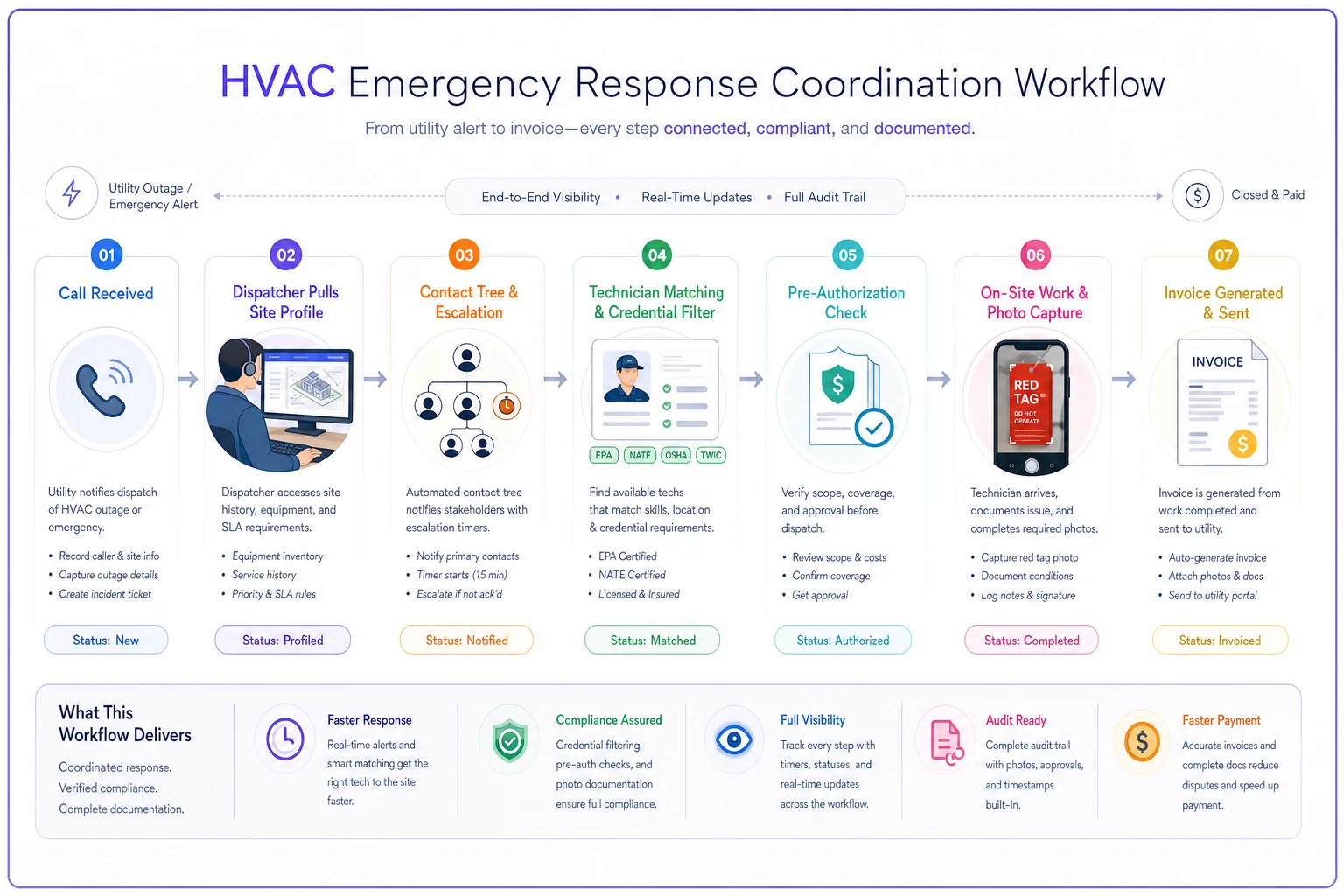
Running this in the wrong order — or skipping steps because it's 11 PM and the PM is panicking — is where the write-offs and disputes come from. The sequence itself isn't complicated. The challenge is having the site profile accurate enough to trust at that moment.
Start with your top ten accounts
You don't need to template all 60 sites this month. Pull your ten highest-volume or highest-risk commercial accounts and build the access template, contact tree, credential profile, and billing terms for each. Negotiate the standing pre-authorization and the SLA language while things are calm.
The next utility red tag that hits one of those ten accounts will tell you immediately whether the work was worth it. Utility-triggered emergencies are won or lost in the first hour, and almost all of that hour is coordination you could have prepared for in advance.
Utility-triggered emergencies are won or lost in the first hour, and almost all of that hour is coordination you could have prepared for in advance.
Ready to optimize your HVAC operations?
Join hundreds of HVAC businesses using Coolyly to save time, improve technician utilization, and enhance customer satisfaction.