
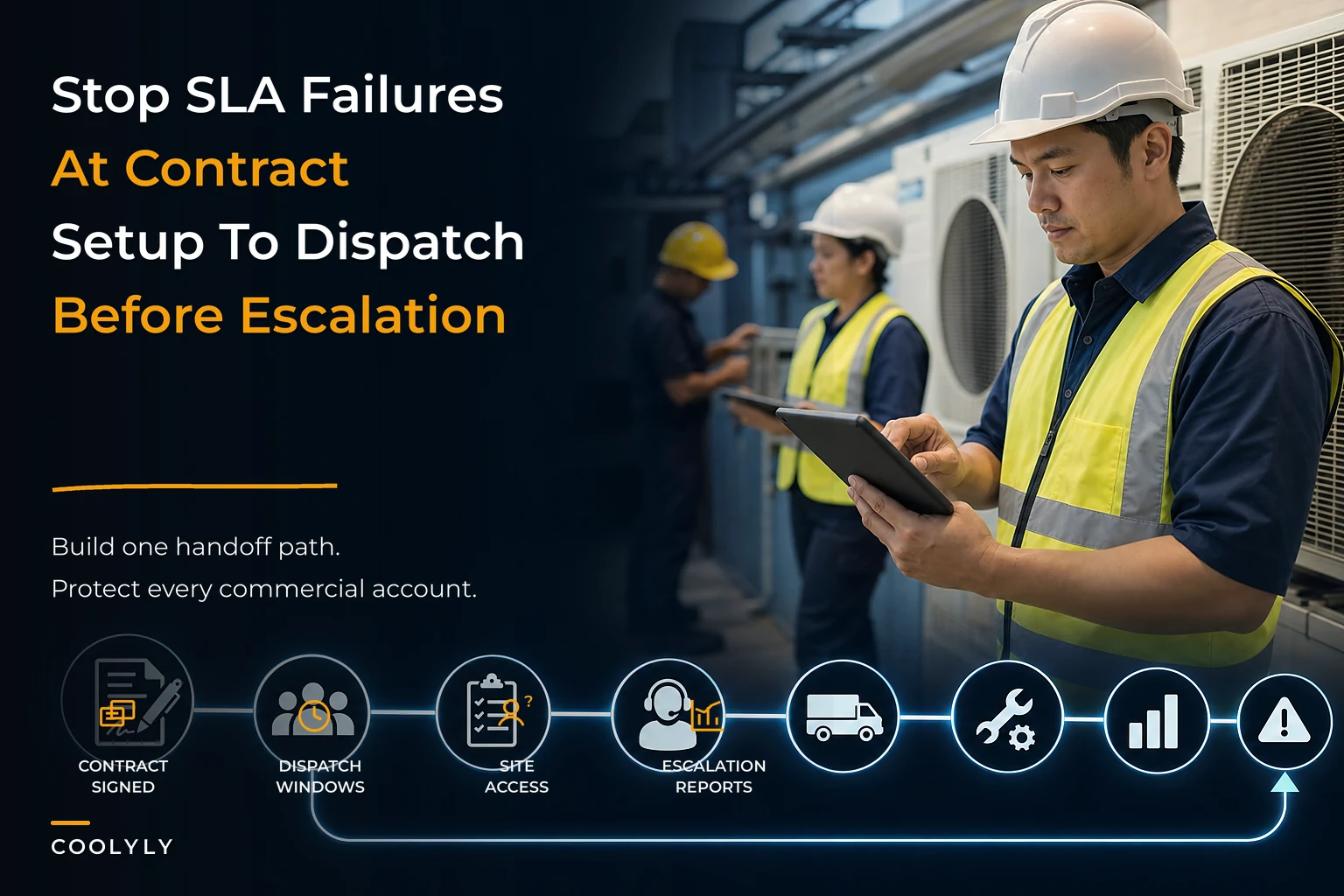

The residential side of an HVAC business forgives sloppiness. A homeowner reschedules, waits an extra day, and mostly forgives you if the tech is friendly. Commercial and multi-site accounts don't work that way. A property manager overseeing 14 retail locations doesn't care that your dispatcher had a rough morning. They have a signed agreement, a response-time clause, and a facilities director breathing down their neck. Miss the window twice and you're on a performance review you never got invited to.
What makes commercial HVAC account management so brutal isn't the technical difficulty. Most shops can service a rooftop unit fine. It's the coordination layer sitting underneath every job — who gets called, how fast, with what access, and what gets reported back to whom. That layer is invisible when you have three commercial accounts. At thirty, it's the thing that decides whether you keep the contract or lose it at renewal.
The failures almost never come from a bad technician. They come from handoffs — contract to dispatch, dispatch to field, field back to the account. Each handoff is a place where information gets dropped, and every dropped handoff eventually shows up as an SLA breach nobody logged until the client brought it up.
The handoff map: where commercial accounts actually break
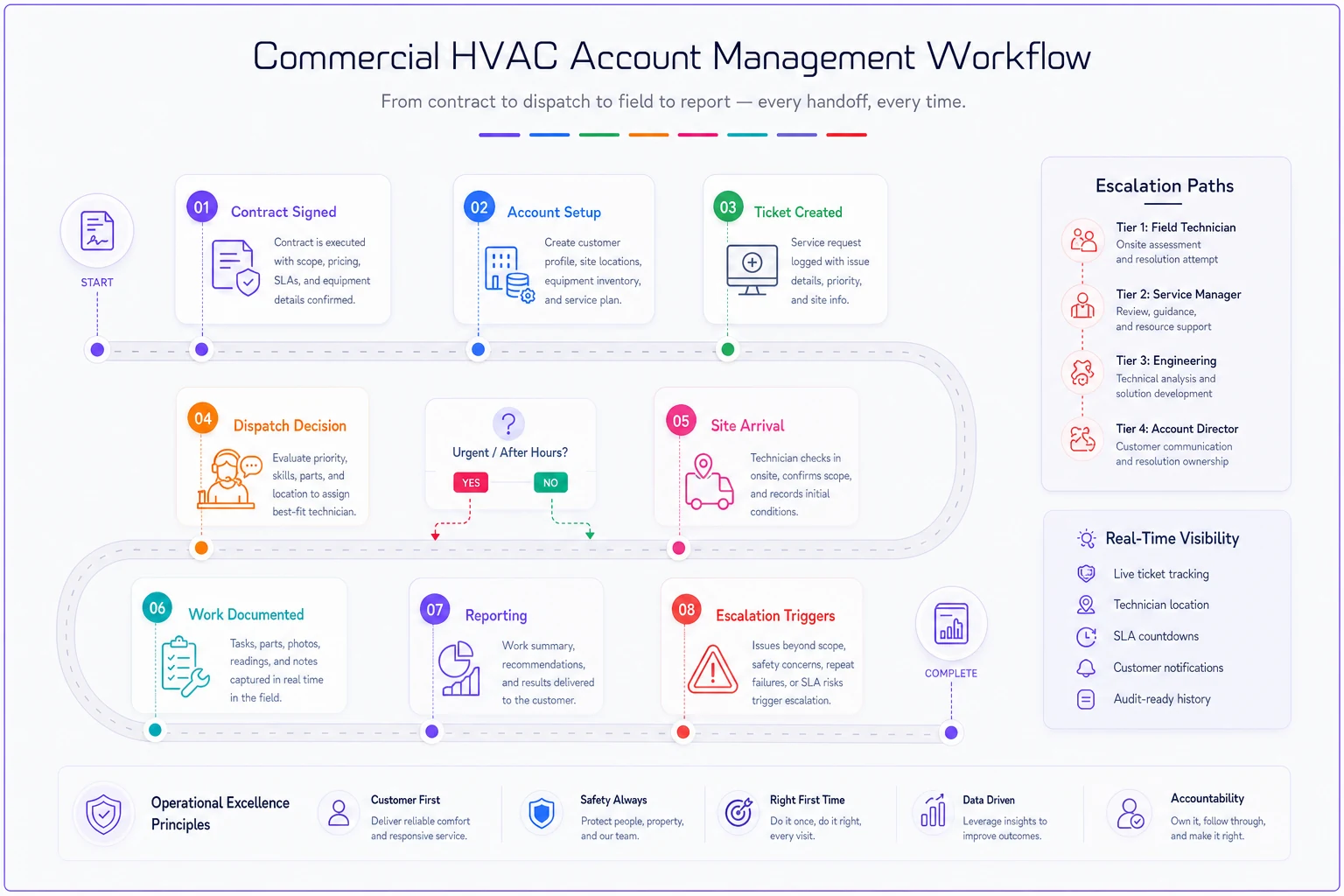
Before fixing anything, it helps to see the full path a commercial obligation travels. Most owners think in terms of "we got a call, we sent a guy." There are more moving parts than that, and each one is a failure point.
The chain, simplified:
-
Contract signed — SLA terms, covered equipment, response windows, and escalation rules live in a PDF someone filed.
-
Account setup — site list, access requirements, primary contacts, and billing rules get entered somewhere (or don't).
-
Call/ticket created — a request comes in and gets classified by priority.
-
Dispatch decision — someone matches the ticket to a tech, factoring skill, location, and the SLA clock.
-
Site arrival — the tech needs badge access, a PO number, a point of contact, and sometimes a safety orientation.
-
Work performed and documented — with evidence the client's system will actually accept.
-
Reporting back — status updates, completion confirmation, and the monthly rollup that lands on the facility director's desk.
Notice how many of these steps have nothing to do with turning a wrench. The wrench part is step 6. Everything else is coordination. And the most common breakdown across multi-site operators is that steps 1 and 2 — the contract terms and the site setup — never actually connect to steps 4 and 5. The SLA lives in a filing cabinet. The dispatcher works from memory.
A simple workflow diagram helps make handoffs visible.
The failures almost never come from a bad technician. They come from handoffs — contract to dispatch, dispatch to field, field back to the account. Each handoff is a place where information gets dropped, and every dropped handoff eventually shows up as an SLA breach nobody logged until the client brought it up.
SLA definitions that dispatchers can actually act on
One mistake that sinks more contracts than any technical failure: writing SLAs in legal language that means nothing to the person doing the dispatching.
Eliminate scheduling chaos and missed jobs.
Coolyly helps HVAC companies book, coordinate, and track every service efficiently.
- Unified appointment & dispatch management
- Automated client notifications
- Technician scheduling & job tracking
No credit card required
A contract might say "Contractor shall respond to Priority 1 requests within four (4) business hours." Fine. But your dispatcher at 7:40 AM doesn't know this ticket is Priority 1, doesn't know the four-hour clock started when the email hit the inbox at 6:15, and doesn't know that "respond" means a tech on-site — not a call back. Three assumptions, three ways to breach.
Good SLA definitions get translated into operational rules before the account ever goes live. Every tier needs to answer four questions in plain terms:
-
What triggers the clock? (Ticket created? Call answered? Email timestamp?)
-
What does "response" actually mean? (Call-back, remote diagnosis, or physical arrival?)
-
What's the window in real hours, not "business hours" ambiguity?
-
What happens when the window is at risk, not just after it's blown?
That last one is where most shops lose accounts. They treat the SLA as a pass/fail line. It isn't — it's a countdown, and the value is in acting before the breach. That's what escalation governance is actually for.
Here's a simplified version of how tiers can map to real action:
| Priority | Example Trigger | "Response" Means | Clock | At-Risk Alert |
|---|---|---|---|---|
| P1 – Critical | No cooling, occupied medical/data site | Tech on-site | 4 hrs | At 2 hrs |
| P2 – Urgent | Partial failure, comfort complaints | Tech on-site | Same day | At 4 hrs |
| P3 – Standard | Non-critical repair, minor issue | Scheduled visit | 2 business days | At 1 day |
| P4 – Planned | PM, filter changes, inspections | Calendar slot | Per schedule | 3 days prior |
The exact numbers depend on your contracts. The point is that fifth column. If your system only tells you about a breach after it happens, you've already lost.
Escalation governance: who owns the clock when it's running out
Most "escalation procedures" are a phone tree with three names on it. That's a contact list, not governance.
Real escalation governance answers a harder question: at what point does responsibility change hands, and who has the authority to break normal rules to protect the account?
In practice, this usually comes up when a P1 clock hits the at-risk mark and no tech is assigned. The natural dispatcher move is to keep waiting for someone to free up. That's exactly wrong. At the at-risk mark, the decision should escalate to someone who can pull a tech off a lower-priority residential job, authorize overtime, or call in a sub. A dispatcher usually can't make that call. A service manager can.
-
Level 0 (Dispatcher) Owns the ticket from creation to assignment. Escalates automatically at the at-risk threshold if unassigned.
-
Level 1 (Service Manager) Can reassign techs, authorize OT, pull from other queues. Owns the recovery decision.
-
Level 2 (Ops Lead/Owner) Involved when a breach is unavoidable. Owns client communication — a proactive call before the client notices beats an apology after.
-
Level 3 (Account relationship) For repeat breaches on a single account, the person who owns the contract steps in before renewal risk builds.
The pattern worth internalizing: escalation should be time-based and automatic, not judgment-based and manual. If it depends on a dispatcher deciding "hmm, maybe I should tell someone," it will fail during exactly the moments it matters most — the busy ones. This is also why the fairness and load-balancing logic that governs day-to-day dispatch, covered in our piece on scaling HVAC field operations without chaos, sometimes has to bend for commercial priorities. Commercial SLAs occasionally need to jump the queue, and your team needs to know when that's allowed.
The contract-to-dispatch handoff nobody owns
A salesperson closes a commercial account. There's a signed agreement, maybe a celebratory lunch. Then the account gets "handed off to operations," which in most shops means the contract PDF gets emailed to a shared inbox and forgotten.
Six weeks later the first ticket comes in and the dispatcher discovers nobody entered the site access requirements, nobody knows which of the client's 11 locations are covered under the base contract versus billed separately, and nobody set up the response-time expectations in the scheduling system. The first job for a brand-new account is a scramble — the worst possible first impression.
The fix is a formal contract-to-dispatch handoff with a required checklist that has to be completed before the account is marked active. An account isn't live until this exists:
-
Covered sites list with addresses and any site-specific quirks
-
Coverage scope per site (what's included, what's T&M, equipment covered)
-
SLA tiers mapped to your operational priorities
-
Access requirements per site (badges, gate codes, escort rules, hours)
-
Primary and escalation contacts on the client side
-
Billing rules (PO required? Per-site cost centers? Approval thresholds?)
-
Reporting expectations (what the client wants to see, how often)
The shops that handle this well treat the handoff like a real meeting with the salesperson and ops team in the same room, not an email chain. Salespeople know things that never made it into the contract — the client's actual pain point, which locations are the political hot spots, who the real decision-maker is. That context dies in an email inbox.
Site credentialing: the silent SLA killer
You can have a tech assigned inside the response window and still breach the SLA because he's sitting in a parking lot for 40 minutes waiting for security to find someone with a badge.
Multi-site commercial work runs on access, and access is wildly inconsistent. One location needs a badge picked up from a front desk that closes at 5. Another needs 24-hour advance notice to security. A hospital wing might require a safety orientation before anyone touches equipment. A data center might demand a background check on file. None of this is the technician's fault, and all of it counts against your response time if it isn't handled up front.
Build a site credentialing template that lives with each site record — not in someone's head. For every location, capture:
-
Access method (badge, code, escort, key box) and where to get it
-
Hours access is possible and who to call outside those hours
-
Advance-notice requirements for security or the client
-
On-site point of contact with a direct number, plus a backup
-
Safety/orientation prerequisites and whether your tech has completed them
-
Parking, dock, and equipment-location notes so nobody wanders a 200,000 sq ft facility looking for a rooftop access ladder
Tie access re-verification to PM schedules so checks happen during planned visits.
Credentialing isn't a one-time setup — that's the part most operators miss. Badges expire. Contacts leave. Security policies change. A site record that was accurate in March will have you locked out in September. Someone needs to own re-verifying access details on a rolling basis, ideally tied to the PM schedule so you're confirming access every time you're already planning a visit anyway.
Tying escalation timelines to account reporting
The monthly report is where you keep or lose the account, and most shops treat it as an afterthought thrown together the day before it's due.
Facility directors and property managers live by numbers — they report upward too. When you hand them a clean rollup showing response times against SLA, breach counts, resolution times, and PM completion, you're not just proving performance. You're giving them ammunition to defend keeping you. When you hand them nothing, or a messy spreadsheet, you're inviting them to shop around.
The reporting has to connect directly to escalation data. Every at-risk trigger, every escalation, every breach and how you recovered it should feed the monthly view. This is the difference between a report that says "we did 47 visits" and one that says "47 visits, 100% within P1 window, two P2 at-risk events both recovered same-day, PM completion at 96%." One is activity. The other is a case for renewal.
-
Real-time
At-risk alerts and breaches logged as they happen, not reconstructed later.
-
Weekly internal
Service manager reviews open escalations and near-misses per account.
-
Monthly client-facing
SLA compliance, breach summary with recovery notes, PM status, and any recommendations.
-
Quarterly business review
Trend lines, recurring equipment issues, and upgrade/retrofit opportunities.
That quarterly review is underrated. It's where the data you've been collecting turns into revenue — recurring failures on aging equipment become a retrofit proposal, and the reporting you built for SLA compliance doubles as the evidence base for it. This connects directly to the logic in our write-up on turning service data into predictable revenue, where the same data trail that protects an account also grows it.
A real scenario: what breaks and what fixing it looks like
Consider a mid-size mechanical contractor running around 22 commercial accounts across roughly 90 sites, alongside a residential book. The problem showed up at renewal season — two solid accounts didn't renew, and both exit conversations mentioned "reliability" and "we never knew where things stood."
The actual failures weren't technical. Response times looked fine on jobs that got completed, but nobody was tracking the at-risk window. A handful of P1s slipped to next-day without anyone flagging it. Site access issues added 20–30 minutes to a chunk of commercial calls because credentialing details lived in the lead tech's memory, and he'd taken PTO. And the monthly reports were a dispatcher manually pulling numbers into a spreadsheet the night before — often late, occasionally wrong.
The fixes were unglamorous. They mapped every SLA tier to an operational priority with an at-risk trigger. They built a site credentialing record for all 90 locations — a slog that took a few weeks. They made the contract-to-dispatch handoff a required checklist before any new account went live. And they standardized the monthly report so it pulled from actual dispatch and escalation data instead of memory.
Over the following two quarters, SLA breaches on commercial work dropped noticeably — not to zero, but near-misses started getting caught and recovered instead of quietly slipping. Access-related delays fell because techs stopped arriving blind. At the next renewal cycle, the accounts that had been wobbling stayed, largely because the property managers now had clean reports they could pass upstairs. No dramatic revenue explosion — just accounts that stopped leaking and a team that stopped scrambling.
Where systems and automation actually help
Everything above can be run on spreadsheets and discipline. Plenty of shops do, right up until the volume breaks them. The breaking point tends to arrive somewhere between 15 and 30 commercial accounts, when the number of simultaneous SLA clocks exceeds what any human can hold in their head.
This is where operational software earns its keep — not as a magic fix, but as the thing watching the clocks you can't. At-risk alerts that fire automatically before a breach. Escalations that route to a service manager without waiting for a dispatcher to remember. Site credentialing that surfaces when a tech is assigned so nobody arrives blind. Monthly reports that assemble from dispatch data instead of a late-night spreadsheet session. AI-assisted platforms are increasingly good at flagging patterns a human misses — the account that's had three near-misses in a month and is quietly heading toward a renewal problem, or the site whose access details haven't been verified since last year.
The value isn't automation for its own sake. It's that the coordination layer — the handoffs where accounts actually break — gets a system watching it instead of relying on someone to remember. If your dispatch logic is still ad hoc, it's worth reading our case for a rule-driven dispatch and scheduling system first, because SLA governance sits on top of solid dispatch. You can't escalate cleanly if the underlying assignment process is chaos.
When to invest in this — and when not to
If you're running a handful of commercial accounts and one owner or manager is keeping the plates spinning, formalizing all of this might be overkill. Building credentialing templates and escalation ladders for five accounts might cost more attention than it saves. Discipline and a good shared calendar can carry you for a while.
The moment to build the real system is when you feel the coordination strain — when tickets start slipping through, when a tech's PTO exposes how much lives in one person's head, when you can't answer "how are we doing against SLA on the Meridian account?" without an hour of digging. That's the signal that you've outgrown memory-based operations.
One warning worth flagging: don't build this infrastructure to win accounts you can't actually service. Some contractors chase big multi-site contracts with SLA terms they have no realistic capacity to hit, then spend a year in perpetual breach. If your technician bench and geographic coverage can't support a four-hour P1 response across a client's footprint, better escalation governance isn't the answer — not signing that contract is, or negotiating terms you can actually meet.
Commercial and multi-site accounts don't leave because of one bad job. They leave because the invisible coordination layer — contract to dispatch, dispatch to field, field to reporting — quietly fails over and over until "reliability" becomes the reason they don't renew. Every SLA breach that surprises you is a handoff nobody owned.
The shops that keep their commercial book aren't the ones with the best technicians. They're the ones who turned contract terms into operational rules, made escalation automatic instead of hopeful, put site access in a record instead of a memory, and gave their clients reports that make renewal an easy decision. Build that system before you need it, and the accounts you fought hardest to win stop being the ones you're quietly afraid of losing.
Ready to optimize your HVAC operations?
Join hundreds of HVAC businesses using Coolyly to save time, improve technician utilization, and enhance customer satisfaction.