

Most HVAC shops sitting on connected thermostats, RTU controllers, and refrigerant sensors treat that data like a byproduct. It piles up somewhere, gets glanced at when a customer calls angry, and otherwise does nothing. Meanwhile the shop keeps sending trucks out for problems that a five-minute look at the data would've flagged days earlier — or never needed a truck at all.
The gap isn't the technology. Sensors got cheap and reliable years ago. The gap is that nobody at the shop decided remote diagnostics is a product with a price, a promise, and a set of rules for when a human gets involved. That's the whole game with HVAC remote diagnostics productization: taking a pile of telemetry and turning it into a service customers understand and pay for monthly.
This post is about the operational spine that makes that work — how you set thresholds so you're not drowning in false alarms, how you write SLAs you can actually keep, how alerts get to the right person, and how the economics of remote-vs-onsite decide whether this becomes a margin machine or a money pit.
Why most "remote monitoring" offerings quietly die
Plenty of shops try this and give up within a year. The pattern is almost always the same, and it has nothing to do with whether customers want it.
It starts with thresholds copied straight from the equipment manual. A tech sets "alert if suction pressure drops below X" using the manufacturer's nominal spec, applies it across every unit in the portfolio, and walks away. Within a week the dispatcher is getting 40 alerts a day — most of them meaningless. A rooftop unit spiking during a defrost cycle. A reading that dips for 90 seconds during startup. A sensor that hiccups when the WiFi drops.
Nobody has time to triage 40 alerts. So people start ignoring them. Then the one alert that actually mattered — the compressor slowly dying on a restaurant's walk-in — gets buried in the noise, the unit fails on a Saturday, and now the customer is furious they were paying for monitoring that "didn't catch anything."
That's not a technology failure. It's a design failure. The monitoring was never turned into a product with rules. It was just a firehose pointed at an already-busy dispatch desk.
Threshold design: the part everyone gets wrong
Good thresholds are the difference between a service that saves money and one that generates busywork. The mistake almost everyone makes is treating a threshold as a single number instead of a condition over time.
Eliminate scheduling chaos and missed jobs.
Coolyly helps HVAC companies book, coordinate, and track every service efficiently.
- Unified appointment & dispatch management
- Automated client notifications
- Technician scheduling & job tracking
No credit card required
A single-number threshold ("alert if delta-T exceeds 25°F") fires constantly during normal operation. A well-designed threshold looks more like: "alert if delta-T exceeds 25°F for more than 20 continuous minutes during active cooling when outdoor temp is above 80°F." Now you've eliminated startup spikes, defrost cycles, and idle readings — and what's left is much closer to an actual problem.
A practical way to structure thresholds into tiers, because not every anomaly deserves the same response:
| Tier | What triggers it | Response | Example |
|---|---|---|---|
| Informational | Minor drift, single out-of-range reading | Logged, no notification | Filter pressure creeping up slowly |
| Watch | Sustained mild anomaly | Daily digest, no dispatch | Delta-T trending high 3 days running |
| Priority | Sustained anomaly with cost risk | Notify + remote review within SLA | Superheat pattern suggesting low charge |
| Critical | Failure imminent or in progress | Immediate route to on-call | Compressor amp draw spiking, high-head lockout |
The part most shops miss: you don't design thresholds once. You tune them per equipment class and per site over the first 60–90 days. A 20-ton rooftop on a grocery store behaves nothing like a residential heat pump, and applying the same rule to both guarantees noise on one side and blind spots on the other.
Tune thresholds per equipment class and per site during the first 60–90 days to kill false alarms before customers see them.
One thing worth pulling from the maintenance side of the business — the same telemetry driving alerts can also feed longer-term patterns. If you're building a data-driven preventive maintenance program, your alert thresholds and your PM triggers should share the same underlying baselines rather than living in two completely separate systems.
SLA commitments you can actually keep
This is where shops over-promise and burn their margins. Someone in sales, excited to close a deal, writes "24/7 monitoring with 1-hour response" into a contract without checking whether the operation can actually staff that.
An SLA is a promise about response, not outcome. You are not promising equipment won't fail. You're promising that when a Priority or Critical alert fires, someone looks at it and acts within a defined window. Write it that way explicitly, or you'll end up in arguments every time a unit dies despite monitoring.
-
Critical alerts remote acknowledgment within 30–60 minutes, 24/7. Dispatch decision within that same window.
-
Priority alerts remote review within 4 business hours.
-
Watch/Informational reviewed in the daily digest, no individual response guarantee.
The number that actually matters is your acknowledgment window during off-hours. If you don't have someone on-call who can log in from home at 11pm, don't sell 24/7 critical response. Sell "next business day" and price accordingly. What kills these programs isn't slow response — it's promised fast response the shop couldn't staff, followed by one missed critical alert and a lost account.
A useful gut-check before signing anything: for each SLA tier, can you name the specific person who handles it at 2am on a Sunday in July? If the answer is "uh," rewrite the SLA.
Alert routing: getting the right thing to the right person
Routing is the operational glue. The goal is straightforward — every alert lands with the person who can act on it, at the urgency it deserves, without a human standing in the middle sorting the pile.
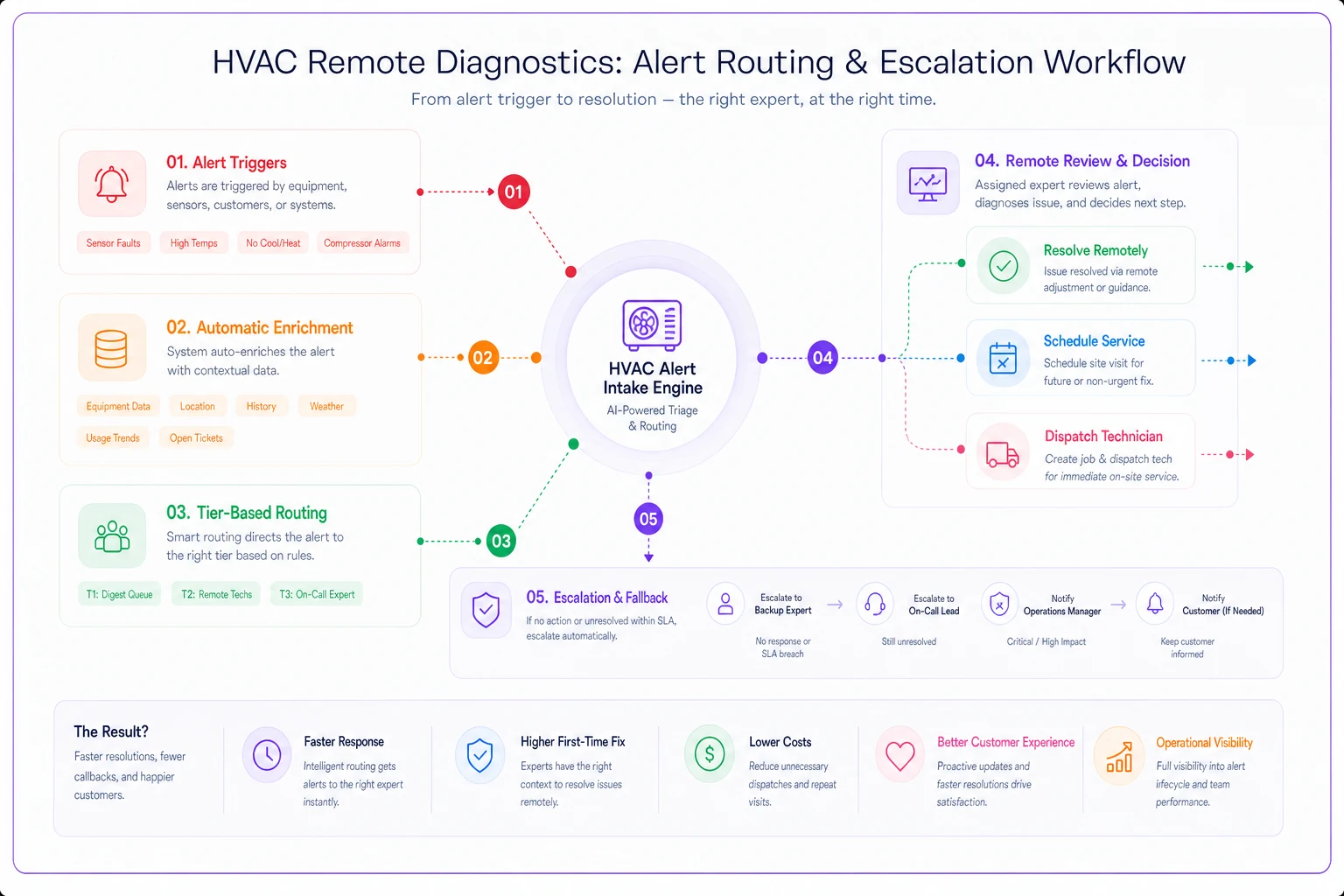
A workflow that holds up in real operations:
-
Alert fires based on tiered threshold logic.
-
Enrichment happens automatically — the alert pulls in the customer's service history, equipment age, warranty status, and any open tickets, so the reviewer isn't hunting through three systems.
-
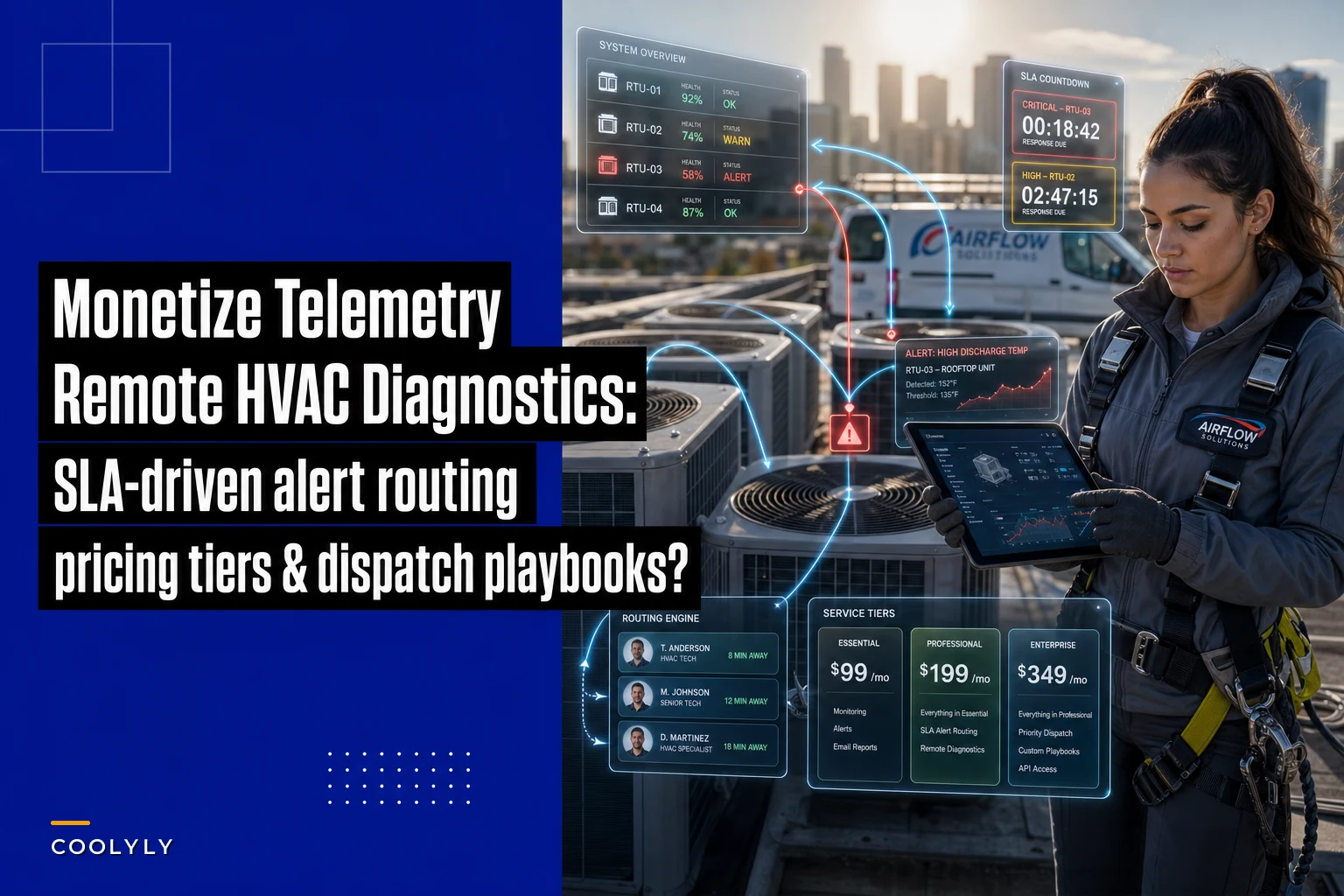
Tier-based routing Informational and Watch go to a digest queue. Priority routes to the remote diagnostics tech's queue with the SLA clock running. Critical pages the on-call directly.
-
Remote review the tech looks at the trend data and decides — resolve remotely, schedule a proactive visit, or dispatch now.
-
Escalation fallback if a Critical alert isn't acknowledged within the SLA window, it auto-escalates to a backup and to the manager.
That escalation fallback in step 5 is what shops consistently forget, and it's the one that saves accounts. People miss pages. Phones die. Someone's in a basement with no signal. Without an automatic re-route, one missed notification becomes one dead compressor becomes one canceled contract.
This is also where clean data architecture stops being optional. If your sensors, CRM, and dispatch don't talk to each other, alert enrichment falls apart — and your remote tech is toggling between tabs trying to remember which customer this even is.
Below is a visual of the alert routing and escalation workflow.
The plumbing behind all of this is covered in more detail in this HVAC integrations and data-architecture playbook, and it's what makes routing feel automatic instead of manual.
The economics: remote resolution vs. rolling a truck
A standard truck roll for a diagnostic call runs somewhere in the $150–$300 range in loaded cost — tech time, drive time, fuel, and the opportunity cost of that person not being on a billable install. In dense urban routes it skews lower; in spread-out rural territories, drive time alone can push it well past that.
A remote diagnostic review costs you 10–20 minutes of a tech's time, maybe a follow-up call. Call it $15–$40 in loaded cost. Even if you can only resolve or defer a portion of alerts remotely, the math moves quickly.
A rough example. Say a shop monitors 120 light-commercial units and generates around 30 actionable alerts a month once thresholds are tuned. Historically, every one of those would've been a truck roll — call it 30 × $220, roughly $6,600/month in diagnostic dispatch cost. With remote diagnostics, suppose:
-
~12 alerts resolve fully remotely (customer adjusts a setting, false condition confirmed, minor fix walked through over the phone)
-
~10 get converted into scheduled visits batched into existing routes
-
~8 genuinely need a dispatch
Emergency-dispatch spend drops by more than half, and the visits that do happen are planned instead of reactive. That's before counting the revenue side — because the customer is now paying a monthly fee for the monitoring itself.
The deeper economic win isn't saved truck rolls though. It's converting reactive emergencies into scheduled work. An emergency Saturday call disrupts three other jobs and gets paid at a premium the customer resents. The same problem, caught Thursday morning by a threshold and scheduled for Friday, is calm, profitable, and makes the customer trust you more.
Pricing tiers that match effort to price
Flat "monitoring for $X per unit" pricing leaves money on the table and confuses customers about what they're getting. Tier it so the price tracks the promise.
-
Basic — data + monthly report. You're collecting telemetry and sending a monthly health summary. No SLA, no live response. Good for price-sensitive residential or low-risk equipment. Often $8–$15 per unit/month.
-
Standard — active monitoring, business-hours response. Tuned thresholds, Priority alerts reviewed within business hours, quarterly trend reviews. The workhorse tier for most light-commercial. Roughly $20–$40 per unit/month.
-
Premium — 24/7 critical response, guaranteed SLA. Full tiered alerting, on-call coverage, fast acknowledgment on Critical alerts, priority scheduling. For customers where downtime has a real dollar cost — restaurants, data closets, medical facilities, grocery refrigeration. Priced to actually cover the on-call staffing it requires.
A common mistake is pricing per site instead of per unit, or vice versa, without thinking about where costs actually sit. Your cost scales with alerts and units, not customer logos. A single customer with 40 problem units on your cheapest tier will quietly eat your margin if you're not careful.
One more thing worth knowing: bundling remote diagnostics into existing maintenance agreements works far better than selling it cold. Customers who already trust you with a PM contract accept monitoring naturally. A standalone "we're going to watch your equipment" pitch often reads as surveillance-for-a-fee to a skeptical owner.
When this makes sense — and when it doesn't
Not every shop or every customer is a fit.
-
You have (or can install) reliable connected equipment across enough units to hit critical mass — a handful of sensors won't justify the operational overhead.
-
You serve commercial customers where downtime has a clear dollar cost.
-
You already have the data plumbing to enrich and route alerts without manual sorting.
-
Your portfolio is mostly aging equipment with no connectivity and customers unwilling to invest in retrofits.
-
You can't staff even a business-hours acknowledgment window reliably.
-
You haven't tuned thresholds and you're tempted to launch anyway. Launching with noisy alerts is worse than not launching — it burns customer trust on day one.
Who should wait: a shop still fighting basic dispatch chaos. If your team can't reliably schedule a normal service call today, adding a real-time alert stream on top just creates a new pile of things to drop. Fix the core operation first, then layer this on.
A real scenario
A regional shop running mostly light-commercial contracts — grocery, a few restaurant groups, some office HVAC — had connected controllers on roughly 90 units but was doing nothing structured with the data. Emergency after-hours calls were their biggest margin drain and the source of most customer complaints.
They spent about two months tuning thresholds per equipment class before selling anything. That felt slow at the time, but it killed the false-alarm problem before it ever reached a customer. Then they rolled three tiers into their existing maintenance agreements. Most customers landed on Standard; the two restaurant groups took Premium.
Within the first couple of quarters, emergency truck rolls for monitored sites dropped noticeably — a large share of would-be emergencies got caught and scheduled instead. The monitoring fees added a real recurring revenue line, somewhere in the low-four-figures monthly and growing as they onboarded more units. The harder-to-measure win: the restaurant customers stopped shopping around, because a competitor offering "we'll come when it breaks" now looked obviously worse than "we saw it coming and fixed it Thursday."
None of that came from fancier sensors. It came from deciding remote diagnostics was a product, and then building the thresholds, SLAs, routing, and pricing to back that decision up.
Where software actually helps
You can run a small version of this on spreadsheets and manual alert checks — plenty of shops start there. It breaks the moment you scale past a handful of accounts, because manual sorting, alert enrichment, and SLA-clock tracking becomes a full-time job nobody signed up for.
Operational software earns its keep here not by doing anything magical, but by handling the repetitive parts automatically: applying tuned threshold logic, enriching alerts with customer and equipment context, routing by tier, running the SLA clock, and escalating when someone misses a page. AI-powered automation makes that whole process consistent — things don't fall through cracks because someone forgot to check a queue. That's what separates a program that survives a busy July from one that quietly falls apart the first week the phones won't stop ringing.
Start with the thresholds and the SLA math — those determine whether this is a real product or an expensive hobby. Get those right on paper first. The routing and the tooling exist to protect the promises you've already decided to make, not the other way around.
Ready to optimize your HVAC operations?
Join hundreds of HVAC businesses using Coolyly to save time, improve technician utilization, and enhance customer satisfaction.